Dispatch and rider safety for blood bikes

When minutes matter, Artery moves.

Artery runs the control desk for blood bike groups. A job comes in by phone, on the job form or straight from a hospital ward. It gets a number, goes to a rider, and is signed for at every handover. All the while, Artery keeps an eye on the person riding it. It's free, and it's staying that way.

Already using Artery? Log in to your group's app →
✓ An SOS that still sends with no signal ✓ Signed for and counted at every handover ✓ Wards can book a run themselves
demo.arterybb.uk
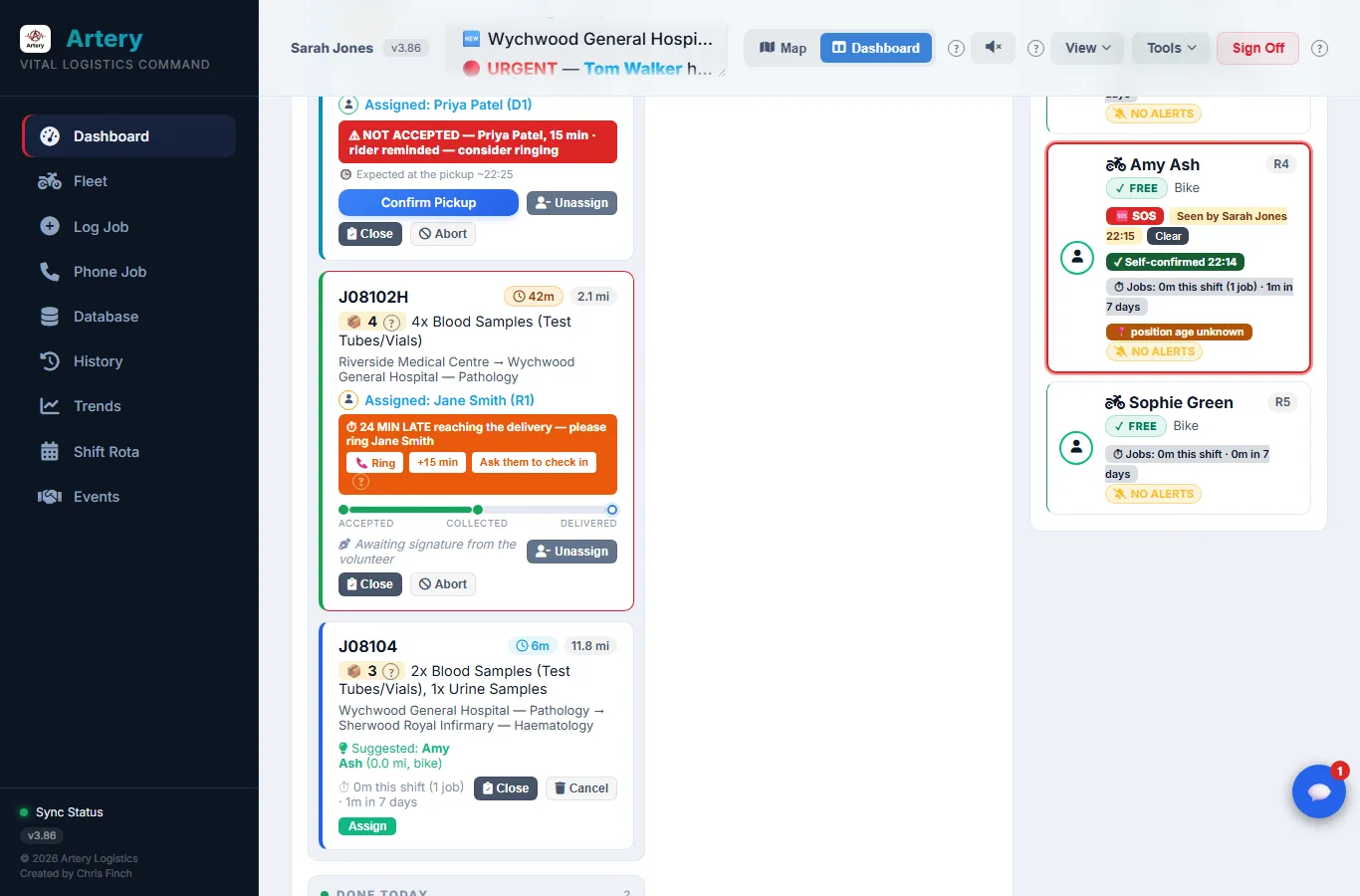
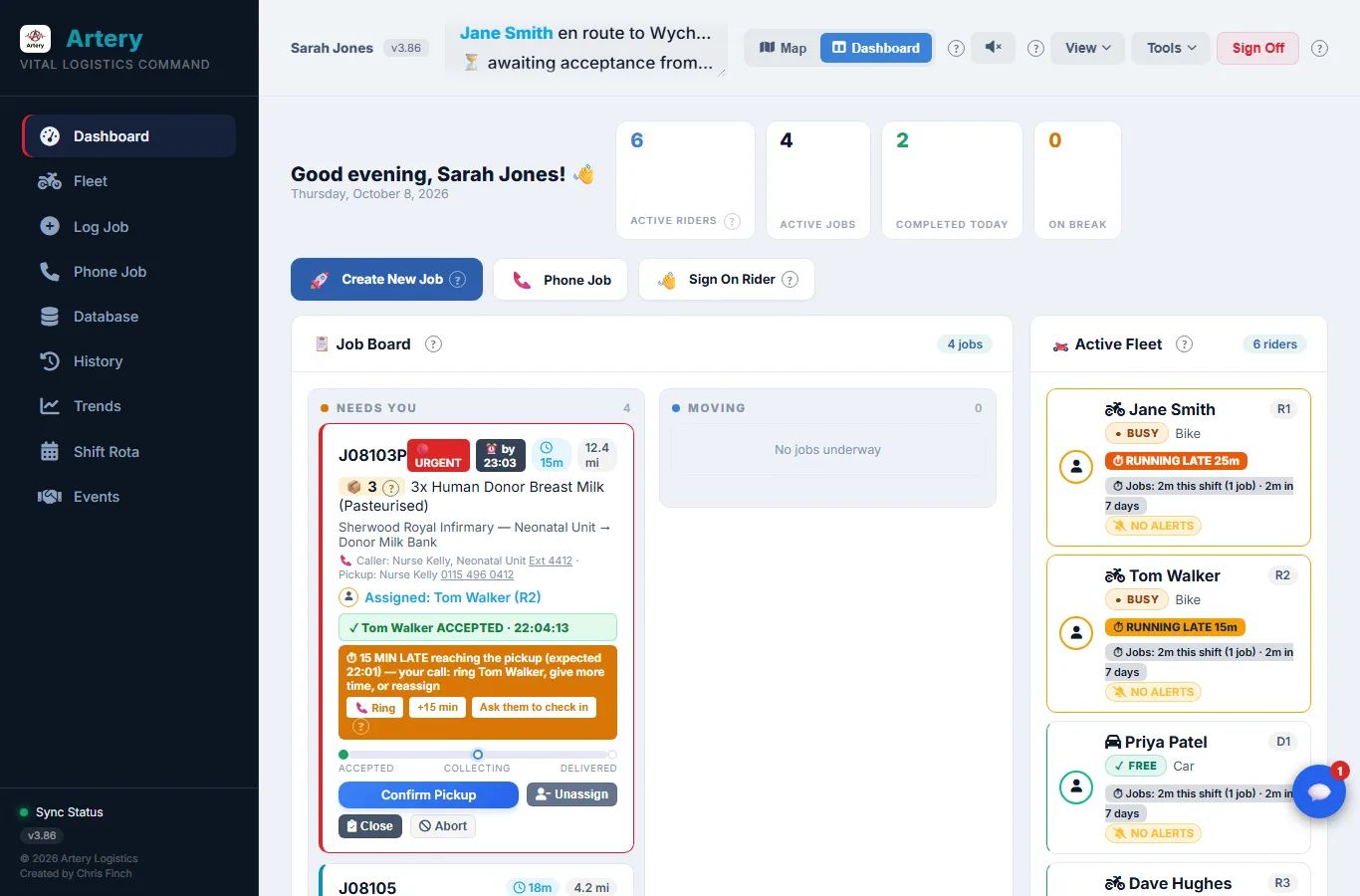
The Artery Dashboard: today's jobs on the board, a rider running late, and the riders on shift
6 riders on shiftSigned on from their own phones
🩸
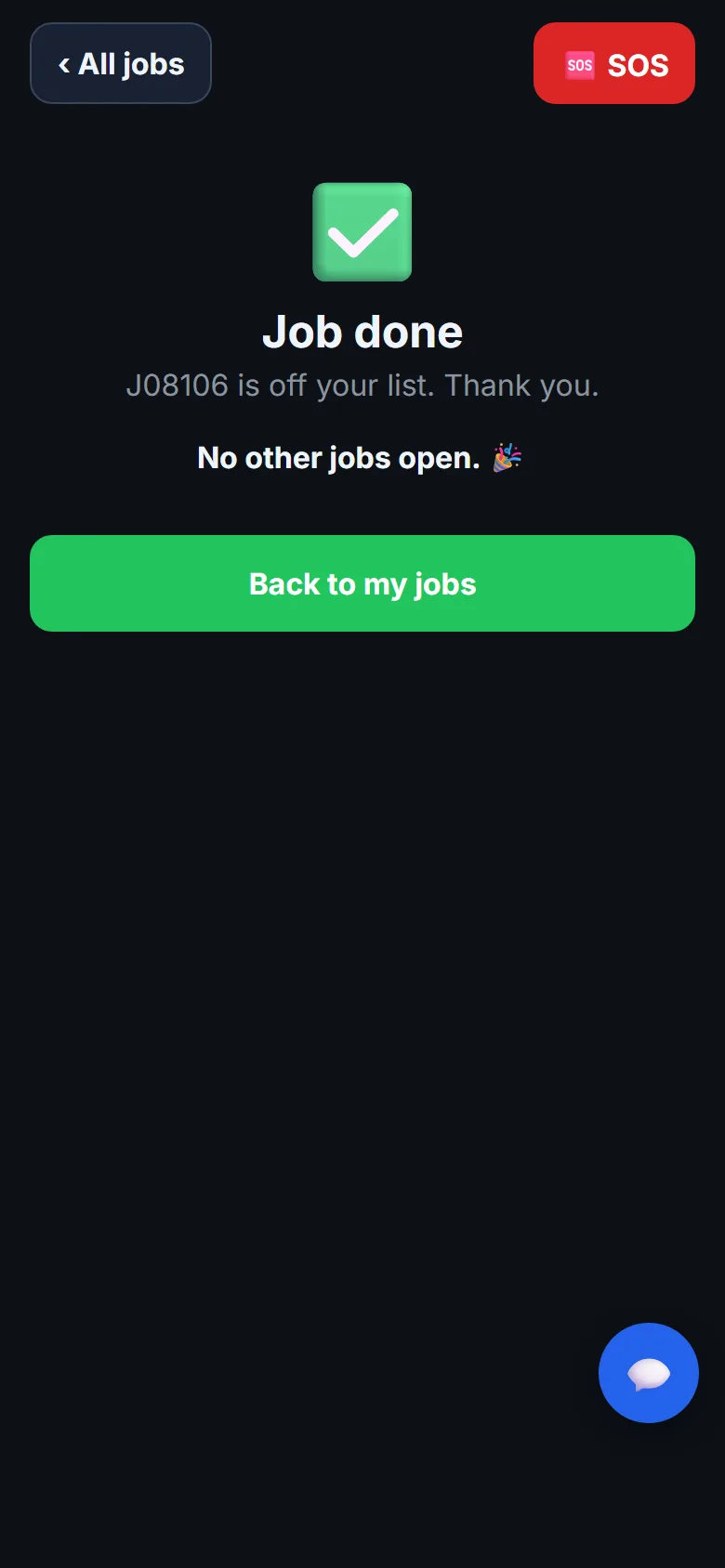
J08106 deliveredSigned for · 3 items counted
4 min
before an SOS nobody has answered goes out to everyone again
10 · 20 · 30
minutes late: the duty controller, then everyone, then a welfare check
£0
what a group pays. Sponsors cover the servers.
v4.00
the current release. It gets better most weeks.
Rider safety

If a rider gets into trouble, nobody has to be staring at a screen

Riders usually go out on their own. Sometimes it's dark, sometimes the weather's foul, and often it's a road they've never ridden. Pressing SOS is one tap. After that Artery does the chasing, and keeps chasing until a person has said "I've got this".

SOS
One tap

It reaches every controller at once

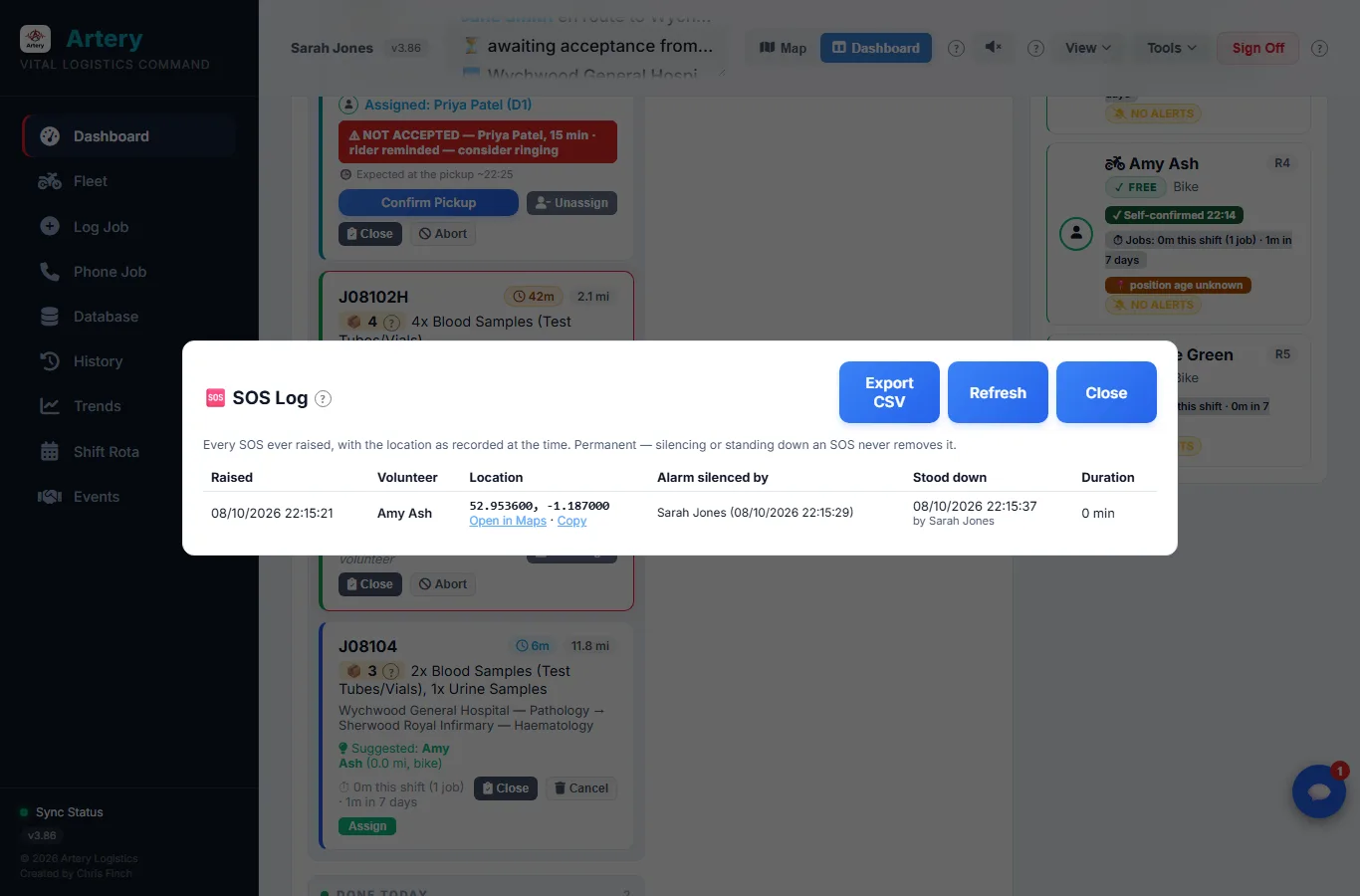
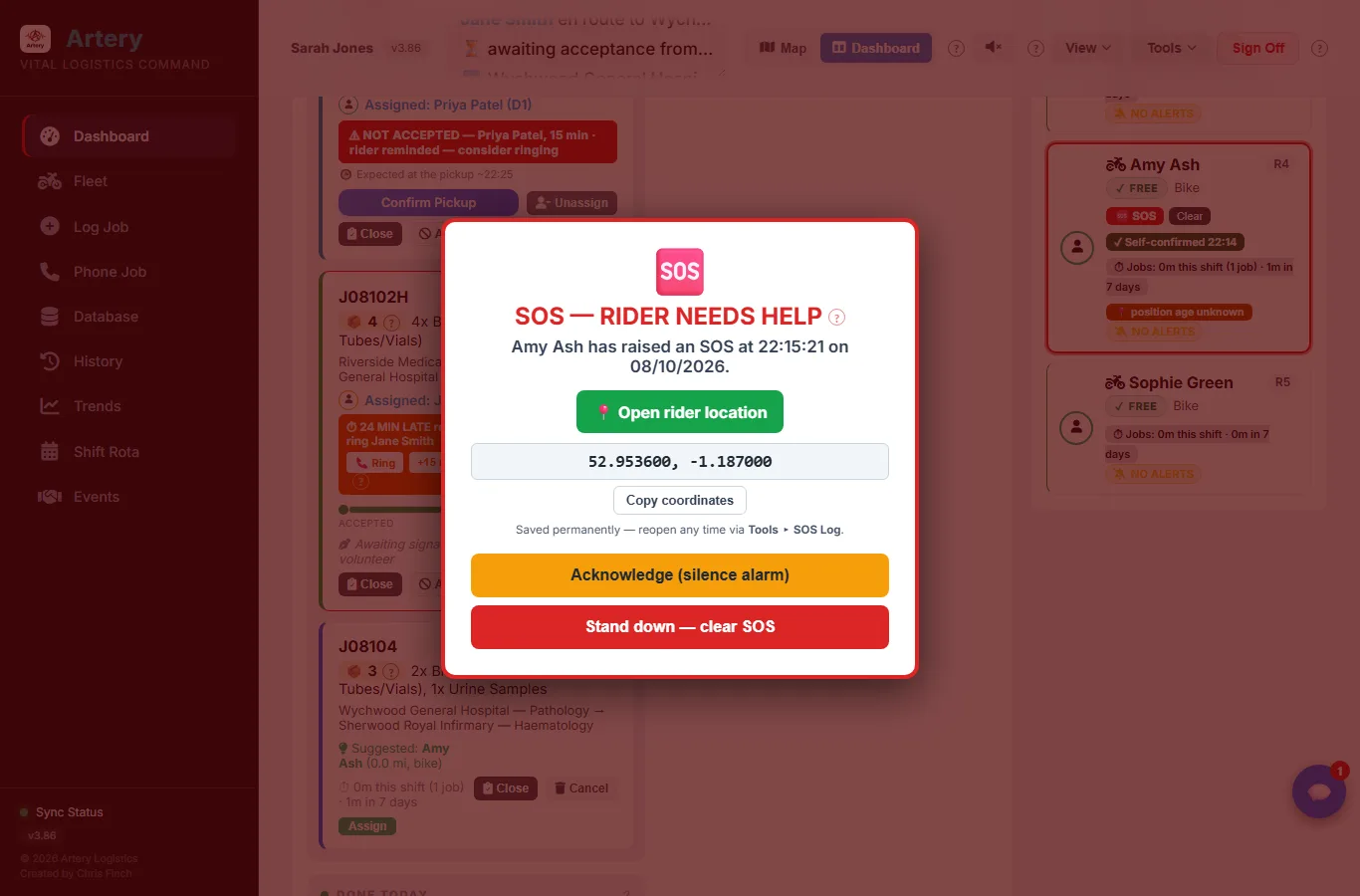
Every console sounds an alarm and every controller's phone gets a notification. The alert says when it was raised and where the rider is, as plain coordinates with a Copy button, so they can be read straight to 999. Once a controller has seen it, the rider's screen says so, and who it was.

✓
No signal

A dead spot doesn't cancel it

With no data, the SOS waits on the phone and sends itself as soon as there's a signal, even if the app has been closed in the meantime. A rider can cancel their own SOS once they're safe. Only a controller can stand down somebody else's.

4′
After four minutes

Nobody answering is treated as a problem

If no one has acknowledged it within four minutes, everyone is alerted again and an email goes to the group's backup address, in case a phone notification has quietly failed. If it's been acknowledged but is still live ten minutes later, everyone hears about it again.

👁
In the background

It keeps an eye on the control desk too

If there's live risk on the board and no controller has done anything for twenty minutes, Artery pages all of them. This runs on the server, so it still works on a quiet shift when every console has been left alone.

📋
For good

Every SOS is kept

Who raised it, when and where, who acknowledged it and who stood it down. Nothing is ever deleted from the SOS log, false alarms included, and it exports to a spreadsheet for incident reports.

Everyday welfare

Most bad shifts start with someone being out longer than anyone noticed

So Artery watches the clock and leaves the rider alone. A phone buzzing every half hour at someone on a motorbike isn't a safety check. It's a distraction.
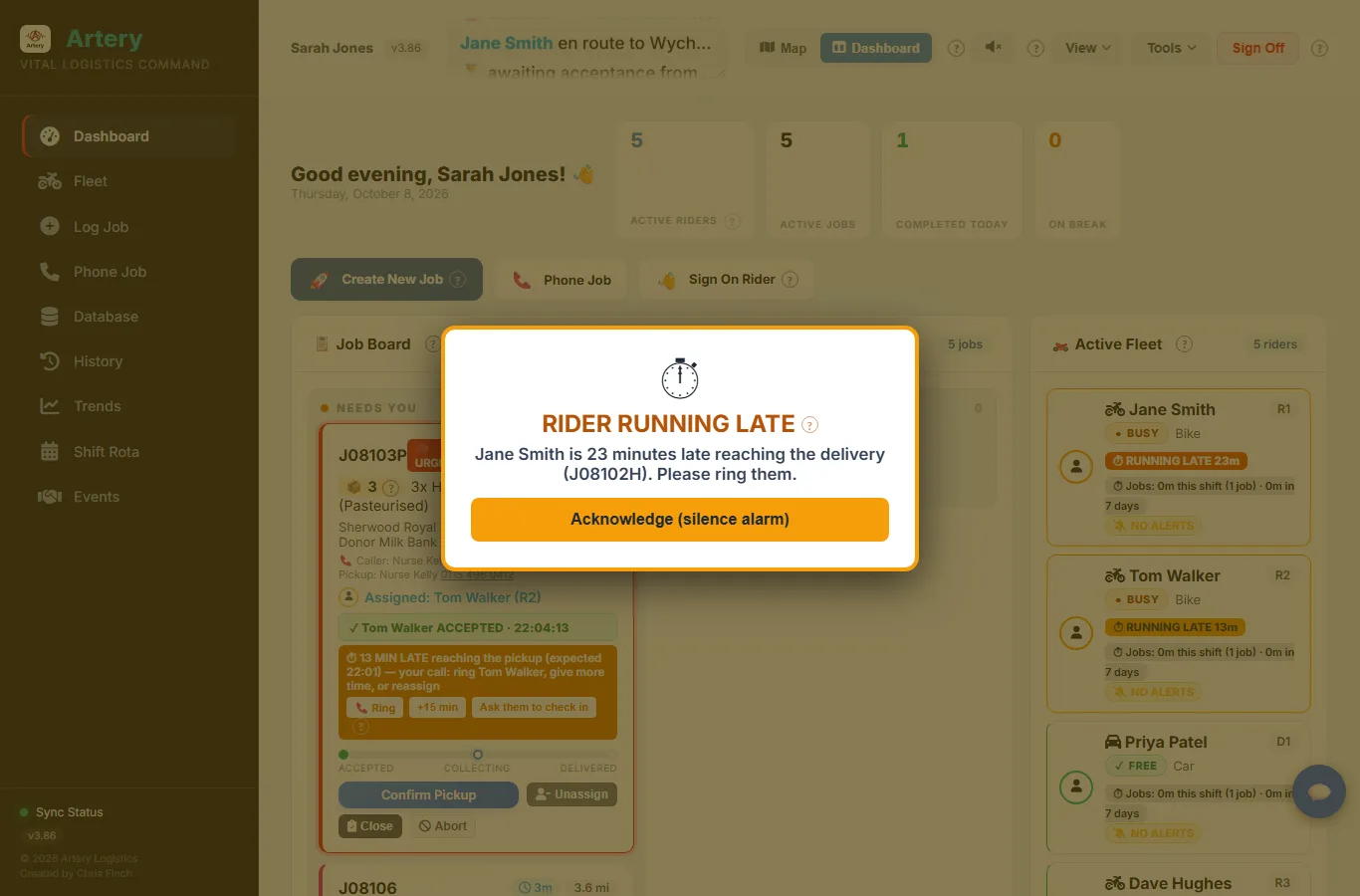
  • ✓ When a job starts, Artery works out roughly when the rider should get there. If they're on time, nothing happens.
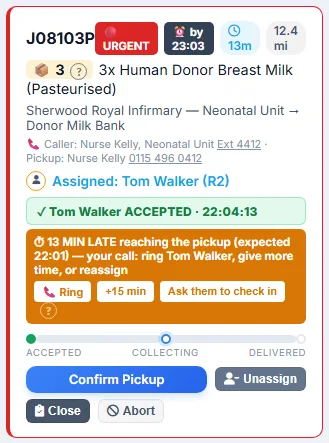
  • ✓ Ten minutes late, the duty controller is told. Twenty, every controller. Thirty, they're emailed too and the rider is asked to tap I'm OK.
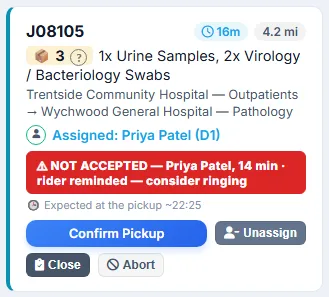
  • ✓ A job nobody has accepted is chased after ten minutes and escalated after twenty.
  • ✓ Arrived, all OK at the pickup, and I'm home safe at the end of the run.
  • ✓ A badge after six hours on shift, so a tired volunteer is easy to spot.
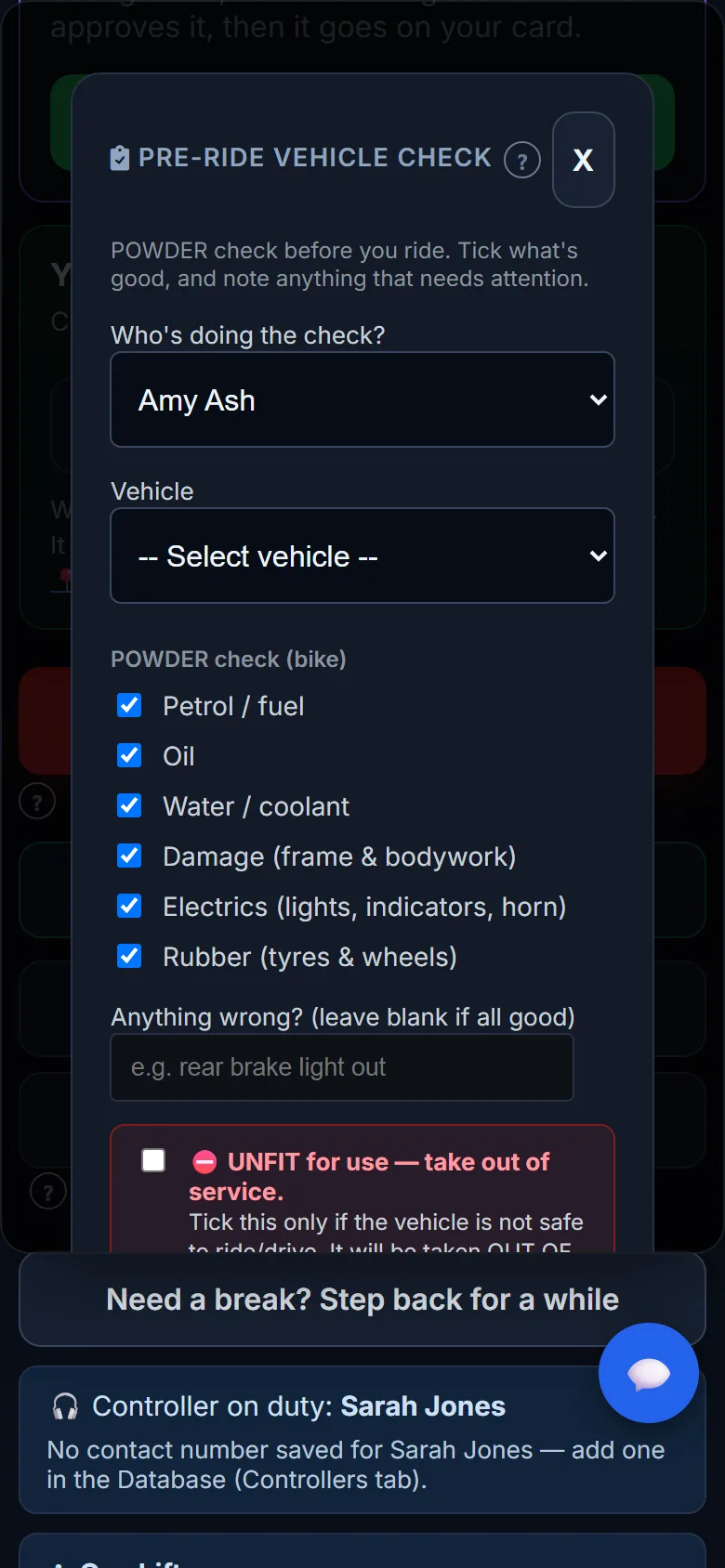
  • ✓ A rider can mark a vehicle unfit. It's off the road until a controller clears it.
The full-screen alarm when a rider is twenty minutes late
An SOS on the controller's screen, with the time, the rider's coordinates and Acknowledge and Stand down buttons
Where riders are, and who can see it

Straight answers about location

Some committees see shift-long position reporting as a lone-worker safety net. Others see it as one step too far. We don't think that's ours to decide, so it's a setting and each group picks.
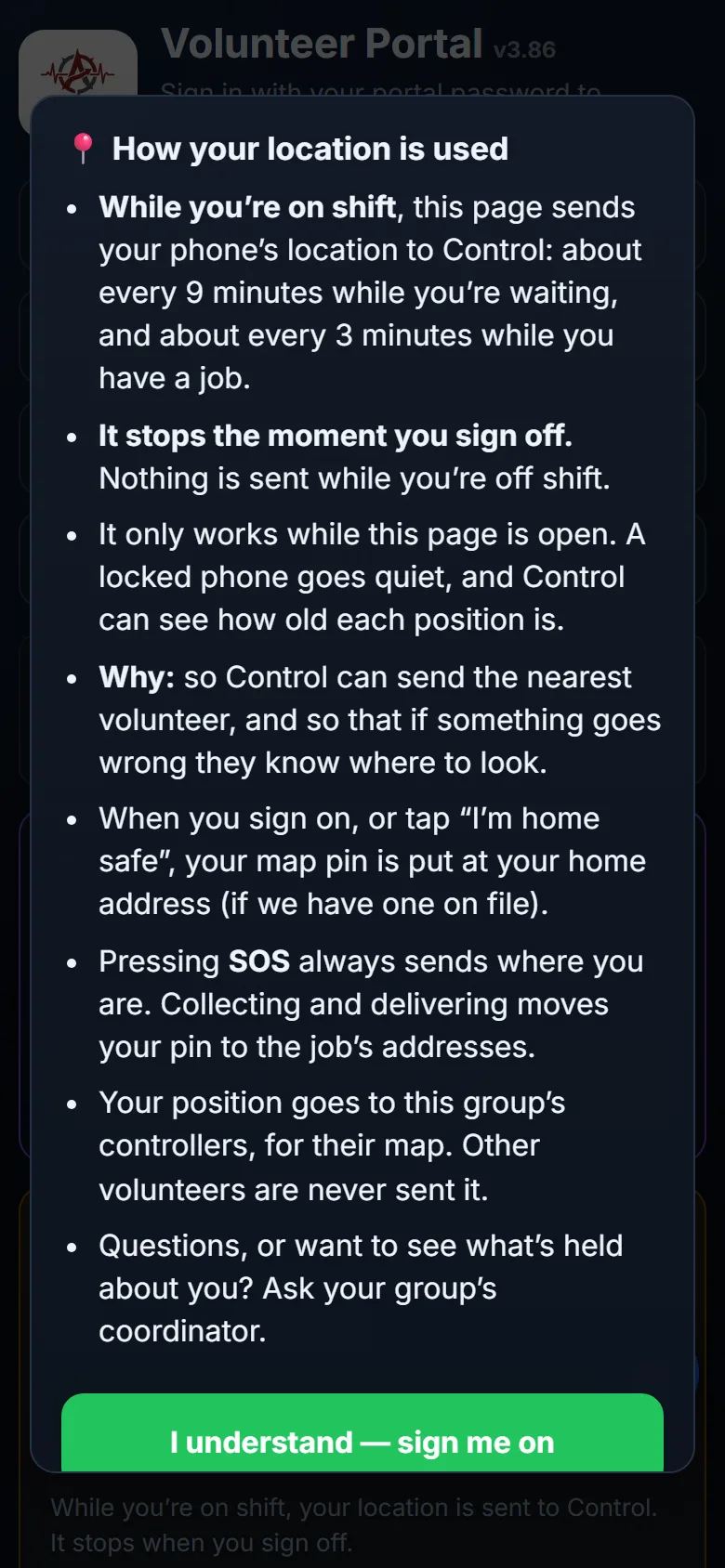
  • ✓ While on shift, only during a job, or not at all. The group chooses.
  • ✓ Before their first sign-on, volunteers are shown in plain English exactly what their group has chosen. Each time someone sees it, it's noted in the change log.
  • ✓ Positions go to the group's controllers and nobody else. Other volunteers are never sent them.
  • ✓ It stops when they sign off. Controllers always see how old a position is.
  • ✓ Whatever the setting, pressing SOS sends where they are.
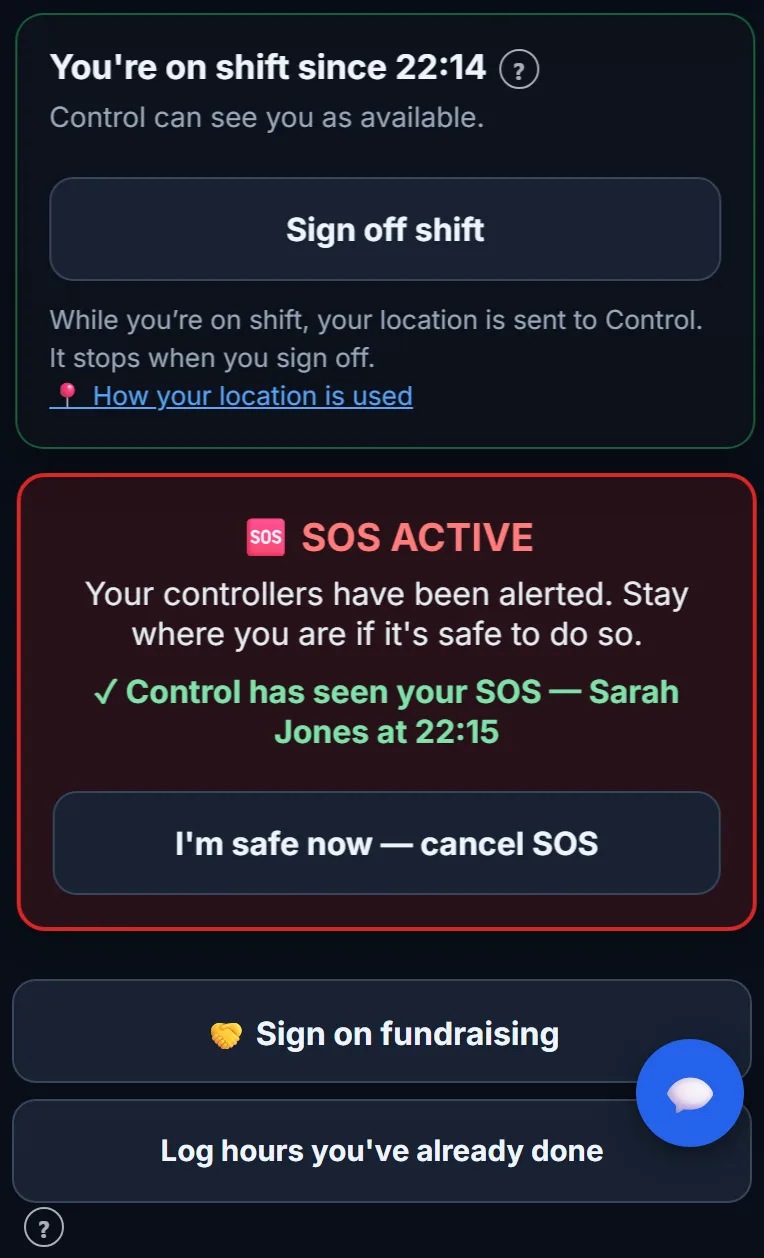
The rider's phone showing SOS active and that Control has seen it
The rider sees when Control has picked up their SOS, and who it was
The location notice a volunteer reads before their first sign-on
What volunteers are told about their location before they first sign on
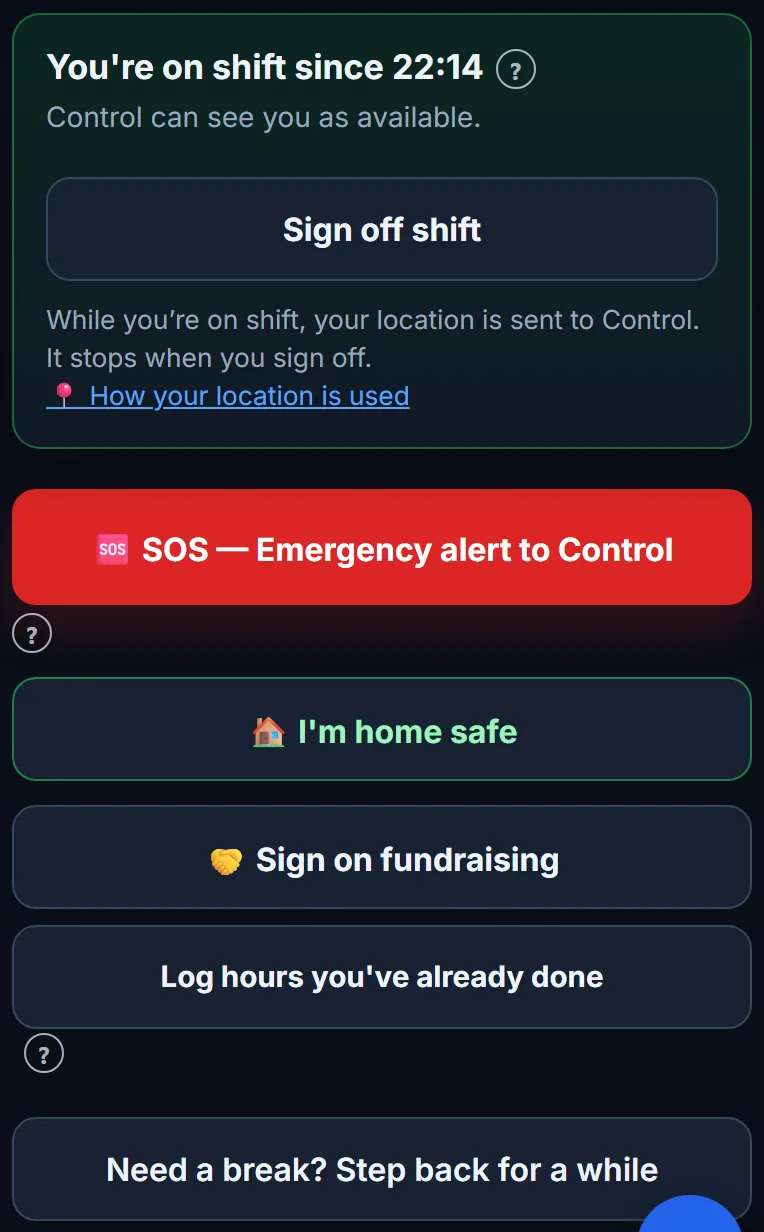
The volunteer's shift card with SOS and I'm home safe buttons
One tap to say they're home. Control's job isn't done until they are.
How it works

One system for the whole run, from the phone call to the last signature

Dispatch, the rider's app, signatures, the rota, hospital requests and reporting all live in one place. No more flicking between a WhatsApp group, a spreadsheet and the notebook by the phone.

The control desk

The whole shift on one screen

Riders, live jobs and routes on a map. Or the same information as cards on the Dashboard, if you'd rather work from a list. Both views do everything, so it's down to what suits the person on the desk.
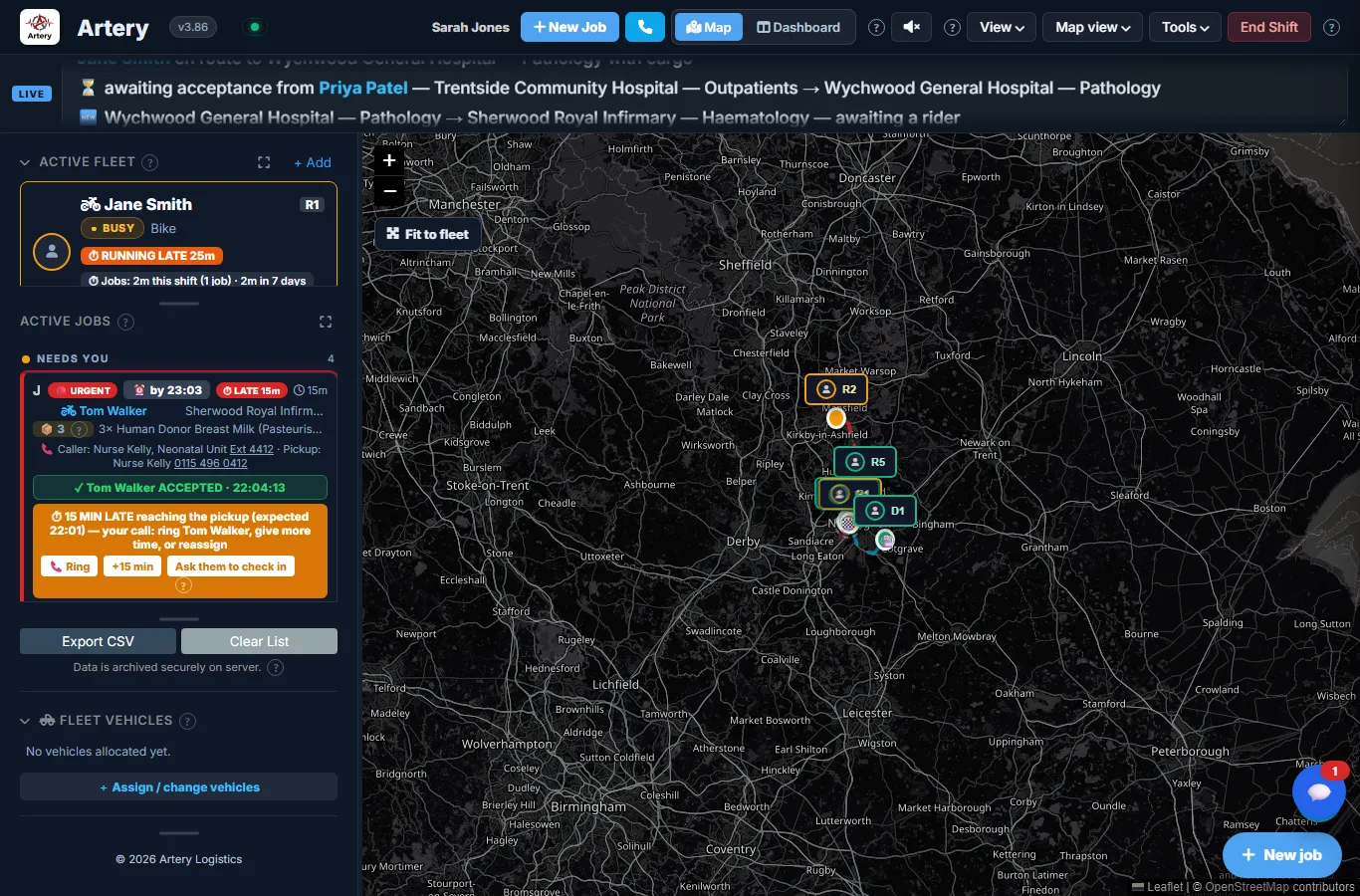
  • ✓ Pickups, drop-offs and road routes drawn for you, with distance and drive time
  • ✓ Who's free, who's busy and who's running late, at a glance
  • ✓ A suggested rider for every job: the nearest free one with the right vehicle
  • ✓ Time on jobs per rider, this shift and this week, so the work gets shared out fairly
  • ✓ Every open screen updates together, and spoken alerts if you want them
The Map view: riders on shift and active jobs beside a live map
Taking a job

A phone call, the job form or a ward request. Same numbers whichever way.

When someone rings, press 📞 and the call sheet opens with the next job number already on it, so you can read it out before they hang up. After that it's just the questions you'd ask anyway: who's calling, which ward, what's going and where to.

J081044th job on 8 October
J08105Ptaken over the phone
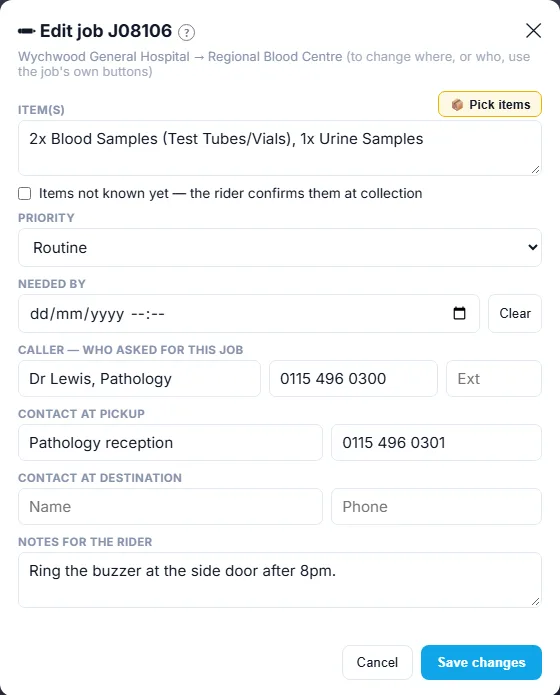
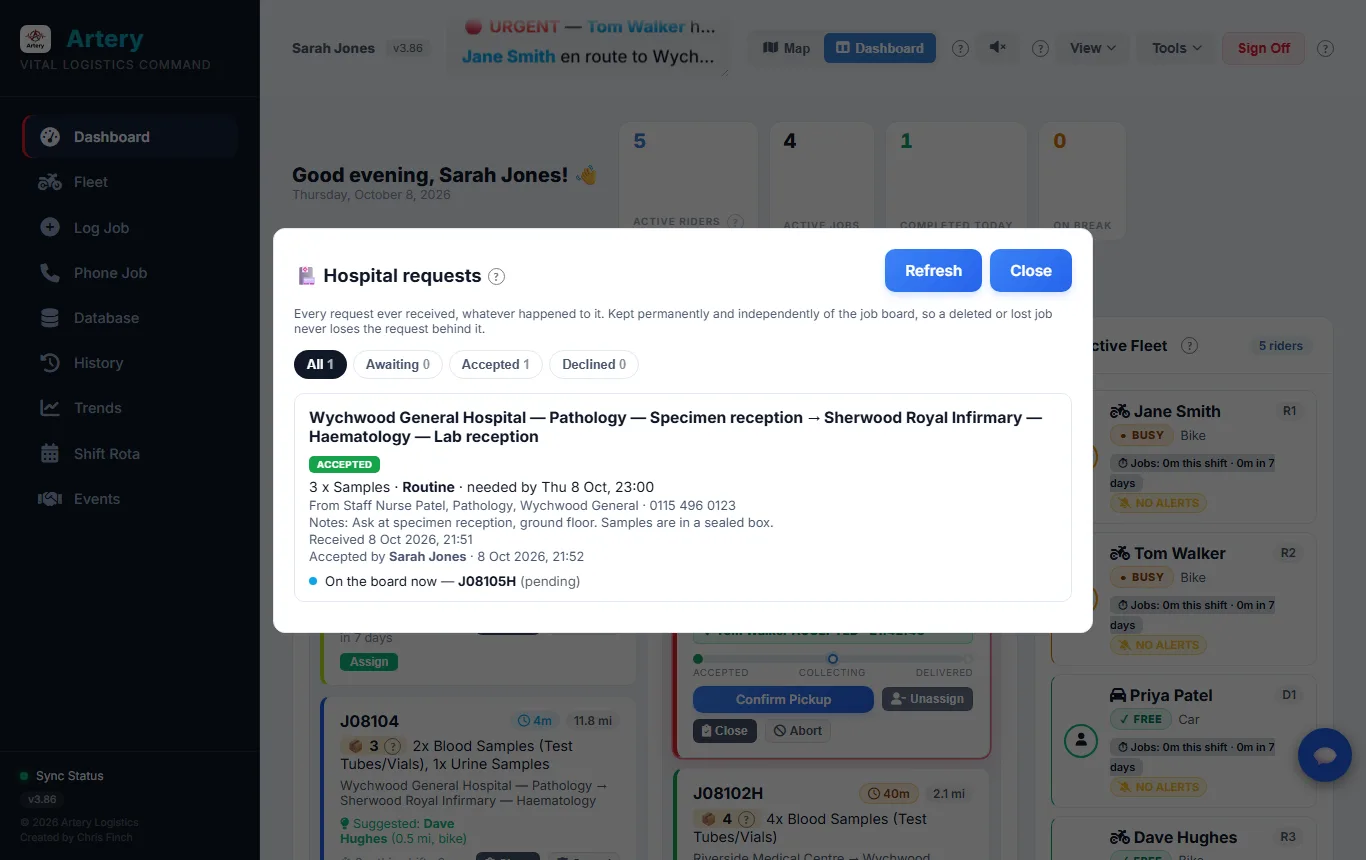
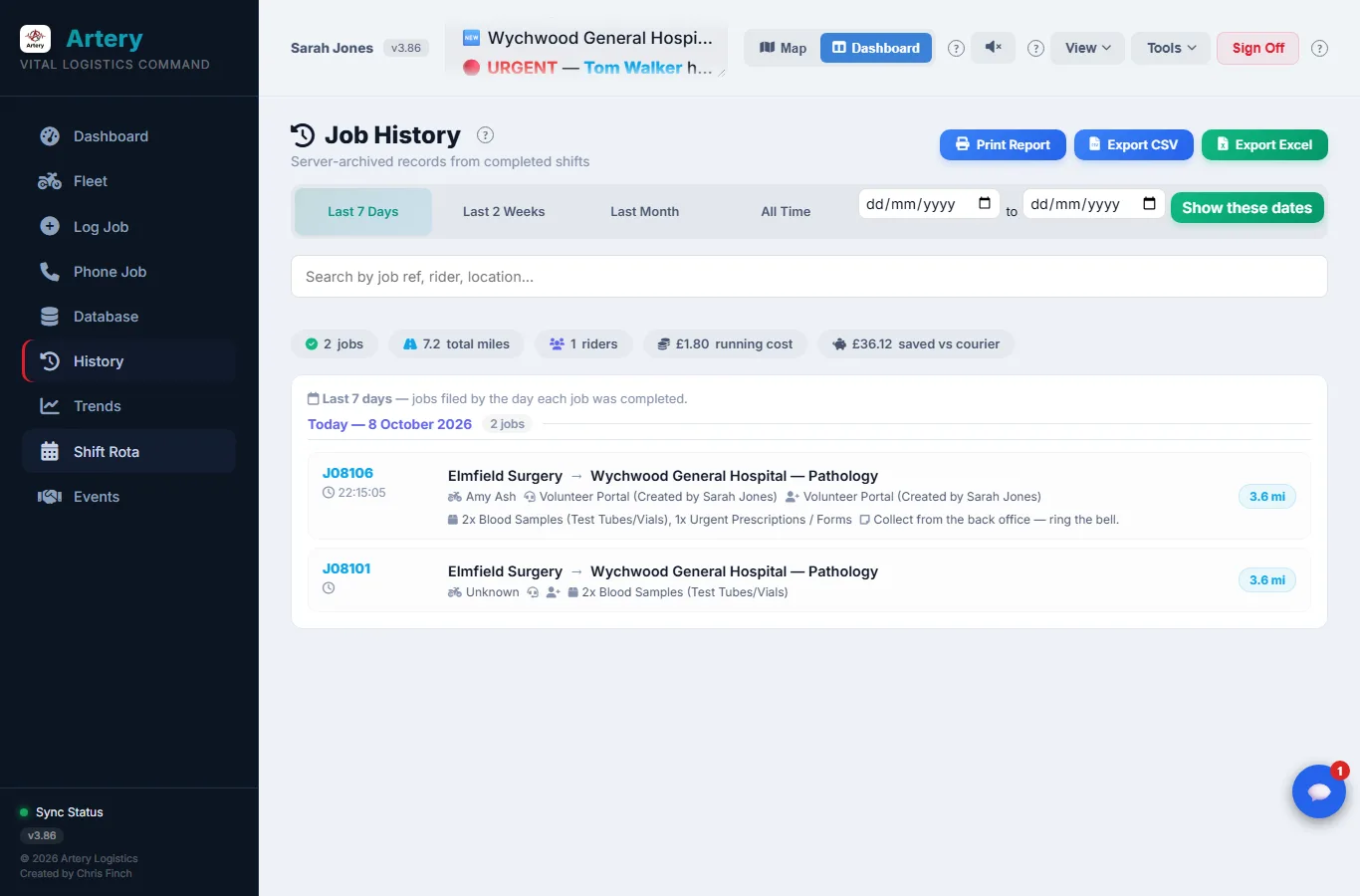
J08106Hfrom a hospital request
R08103the ward's request reference

Every job draws from one sequence a day, so two controllers can never be handed the same number.
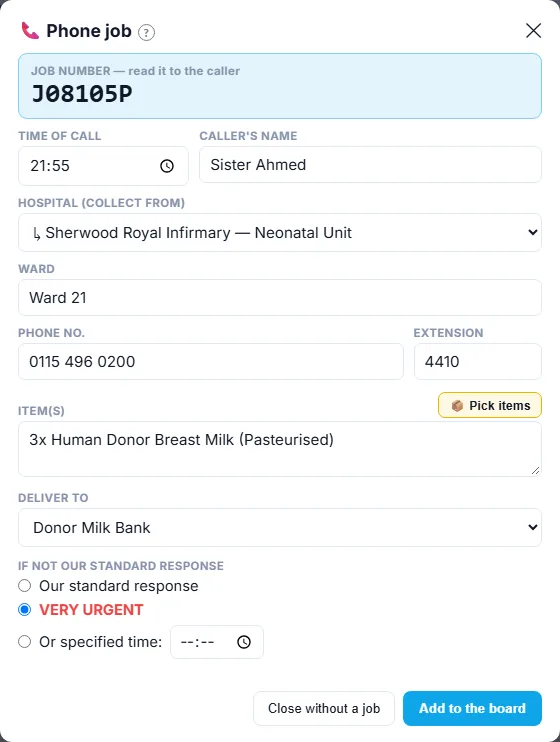
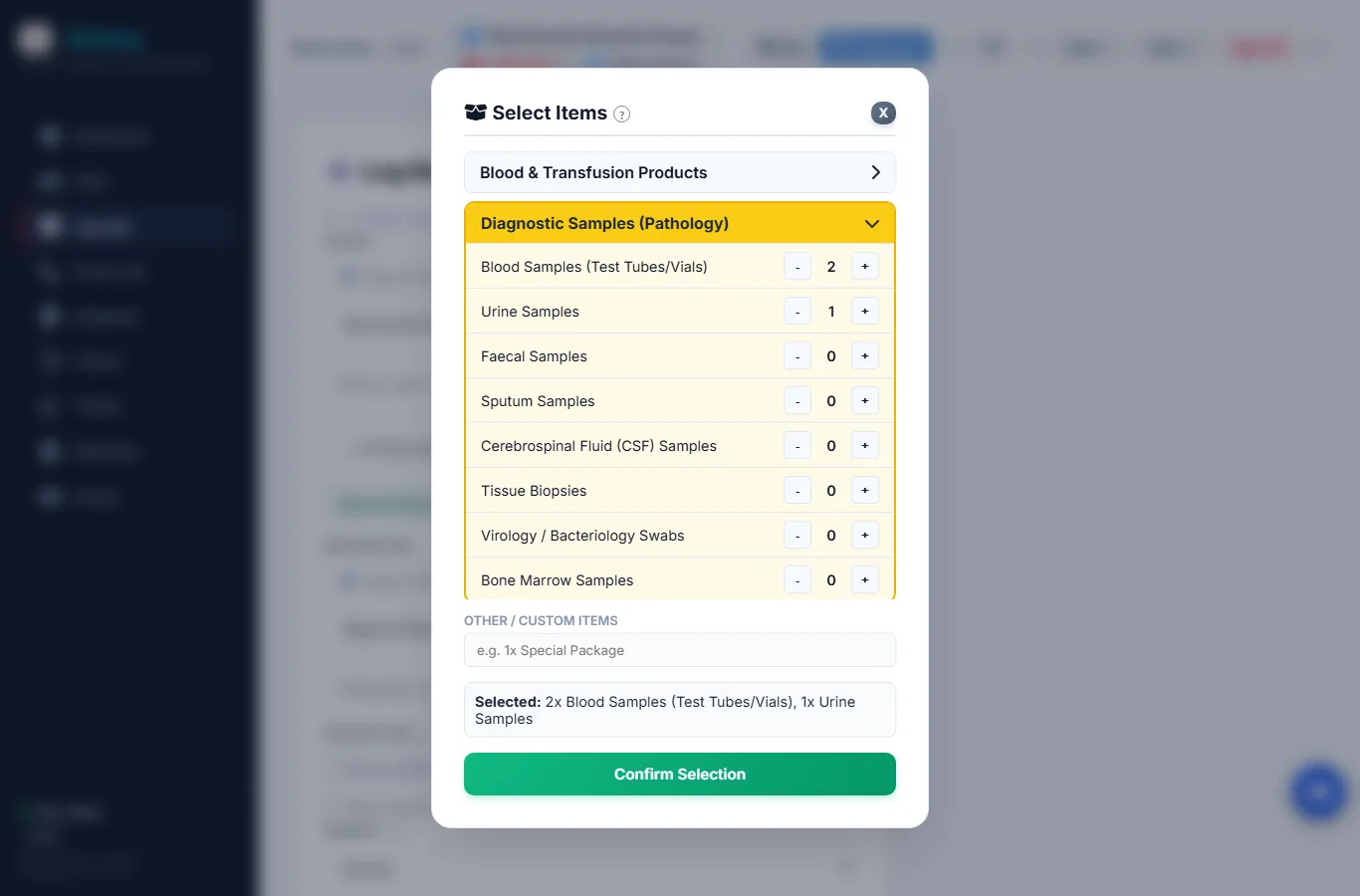
  • ✓ Items picked from a list, with how many of each
  • ✓ Who to ask for at each end, with a call button on the rider's phone
  • ✓ A needed-by time that goes amber, then red
  • ✓ Change a job once it's on the board. The rider is told what's different.
  • ✓ Regular runs set up in advance, which start themselves even if nobody is signed in
The phone job sheet with the job number at the top
Find the right door

Not the hospital. The door.

A postcode gets a rider to a building. On a big hospital site that can still mean ten minutes on foot looking for pathology. Artery keeps a what3words address for individual doors and departments, so the job points at the entrance they actually need.
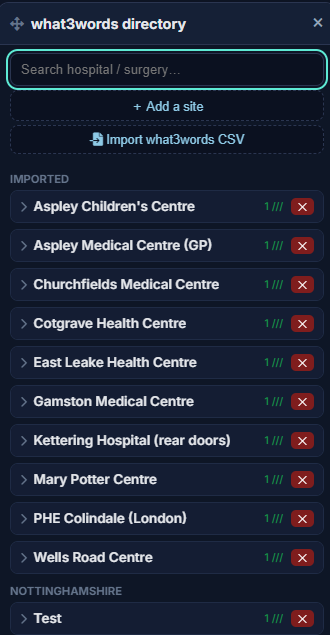
  • ✓ A directory of your sites, with their departments and wards
  • ✓ A what3words address for each entrance on a site
  • ✓ Standing directions for a site ("ring the bell at the side door") added to every job there
  • ✓ Load your whole list from a spreadsheet
  • ✓ One tap on the rider's phone opens their maps app
Location directory showing sites, departments and per-door what3words addresses
The Volunteer Portal

A rider's app you can explain in five minutes

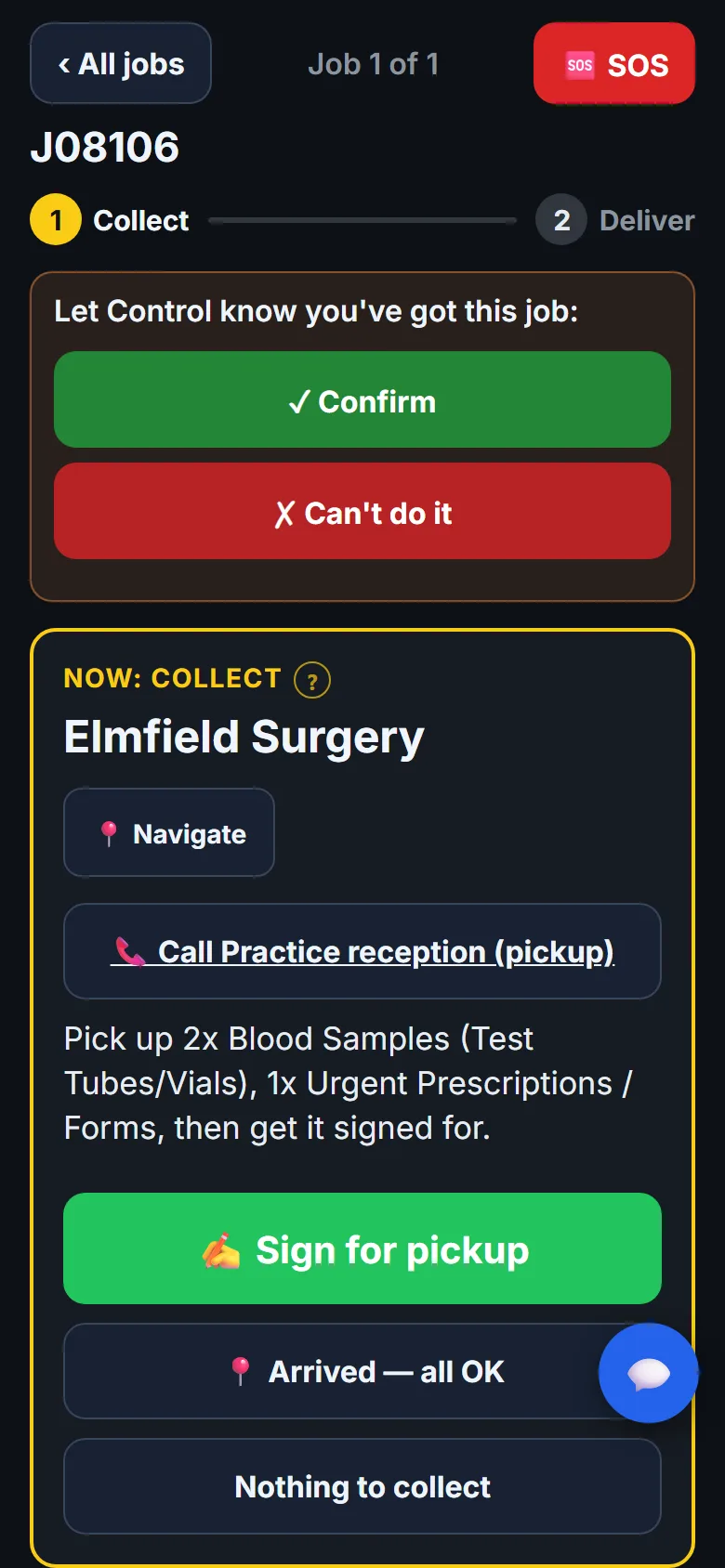
Each job is a card with one big button for whatever comes next: collect, hand over or deliver. Directions, the contact's number and Control's notes are all there. It's meant to be used at the roadside, in gloves, on a phone with a cracked screen.

A job is offered, never forced. It only counts as accepted when the rider taps Confirm. Can't do it sends it straight back to Control with a reason, so "on the way" always means a real person said yes.
  • ✓ Runs in the phone's browser and sits on the home screen like an app. No app store.
  • ✓ No signal? Signatures, answers and SOS wait on the phone and send themselves later.
  • ✓ One password to sign in. There's no list of names to pick from.
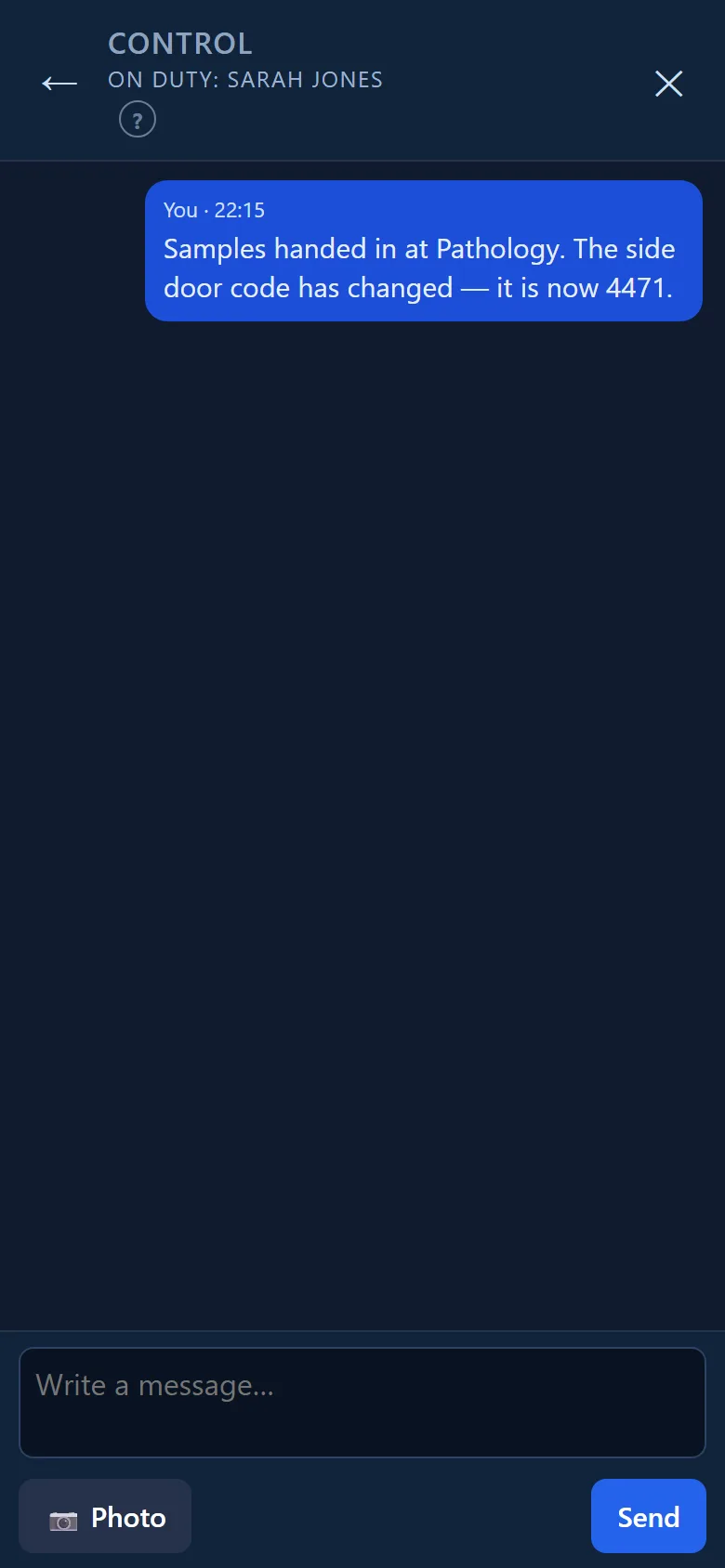
  • ✓ Book shifts, ask for cover, log fundraising hours and message Control with a photo
  • ✓ Built-in help, and a ? next to anything that might need explaining
A job open on a rider's phone: Confirm, where to collect, Navigate, Call and Sign for pickup
Chain of custody

Signed for, counted and timed at every handover

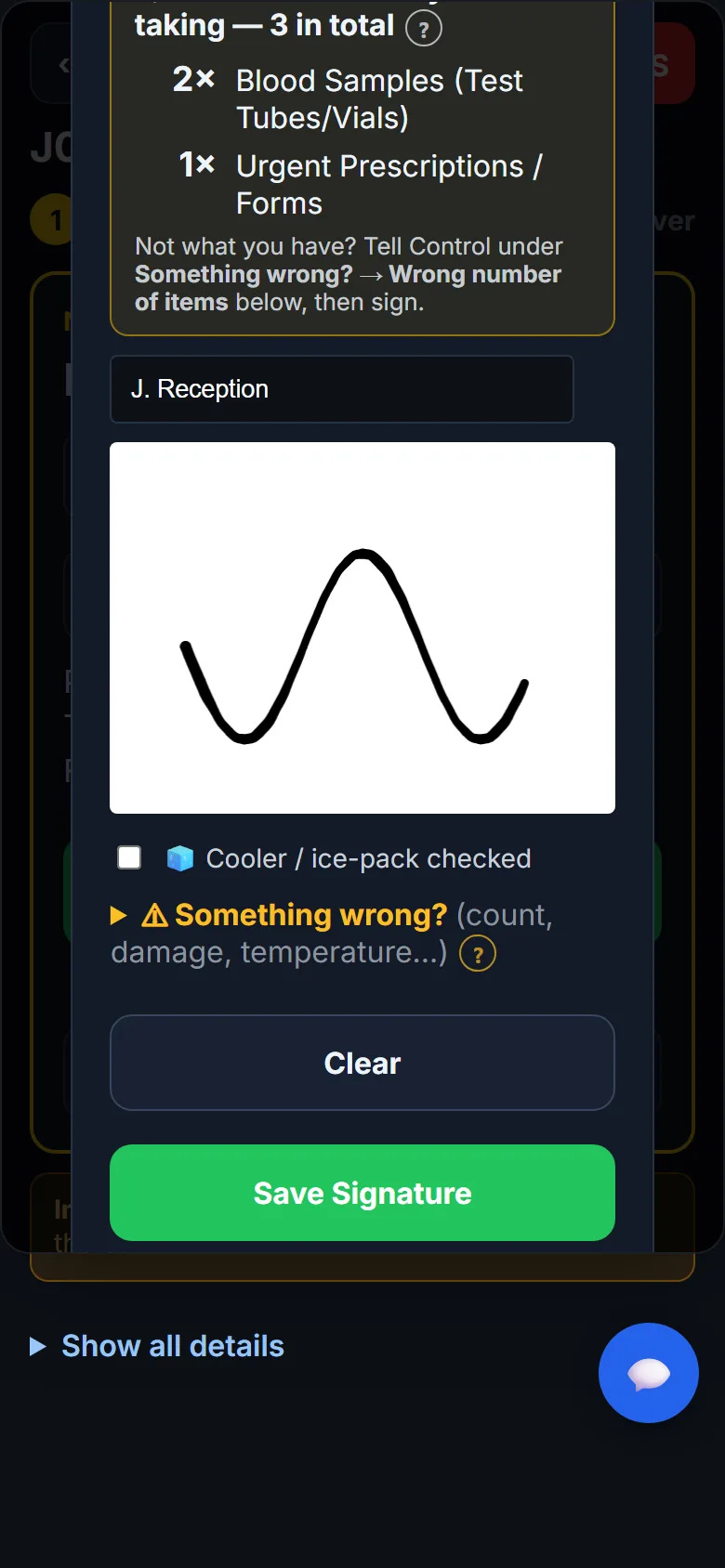
At collection, at any handover between riders, and at delivery, the person handing over prints their name and signs on the rider's phone. Before anyone signs, the screen shows what should be there and how many, so a missing bag gets noticed on the doorstep rather than at the lab.
  • ✓ Item counts checked at every signature
  • ✓ Something wrong? records the wrong count, a damaged box or a warm cooler, and tells Control there and then
  • ✓ Relays between riders, signed by each person who takes it on
  • ✓ A timeline on every job: created, accepted, arrived, collected, delivered, and who did each
  • ✓ Nothing to collect? The trip is still recorded, and still counts.
Signing for a pickup: the item count, the signer's name and their signature
The rota

A rota volunteers fill in for themselves

Four weeks ahead in four-hour blocks, with the controllers along the top. Volunteers book their own shifts from their phone. If they can't make one, they tap Can't make it instead of quietly deleting it, so the gap stays visible until somebody takes it.
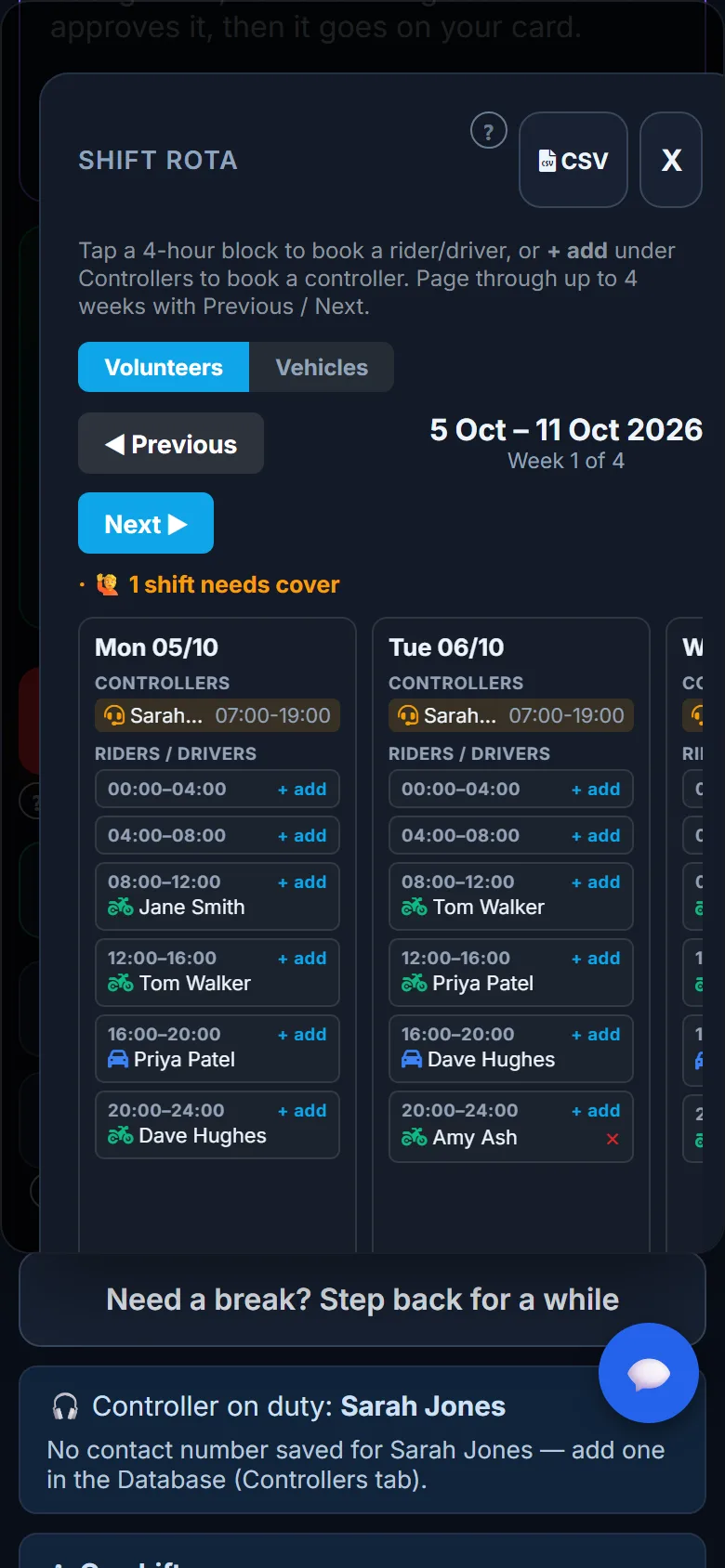
  • ✓ Say how many riders and controllers each block needs, and short blocks show up in red
  • ✓ A gap that appears within 24 hours goes straight to the duty controller
  • ✓ Volunteers change their own shifts. Controllers can change anyone's.
  • ✓ Group vehicles booked alongside the shift
  • ✓ Signing on from the phone shows who's really out, not just who's on the rota
The rota on a volunteer's phone, with a shift that needs cover
For hospitals

Wards can book a run without picking up the phone

There's no account to set up, no app and no training. Ward or lab staff open a web page on any phone or computer, type an access code, and fill in a short form. The request appears on every controller's screen with a chime.

Nothing becomes a job until one of your controllers says yes. Your people still make every decision, and now each one is written down.

Step one

The ward asks

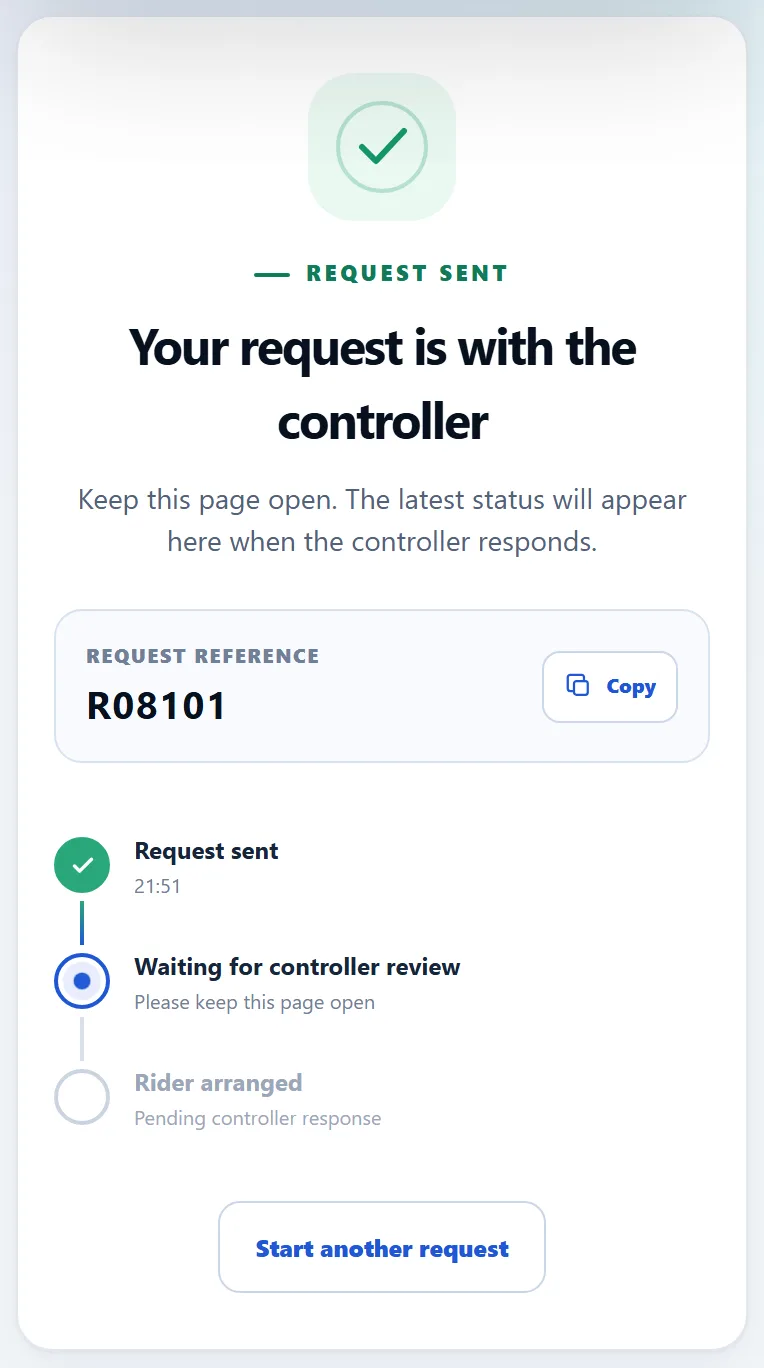
Who's asking and a number to ring them on, where from and where to, what's going and how many, and when it's needed by. It takes a couple of minutes. They get a reference straight away, such as R08103.

Step two

A controller decides

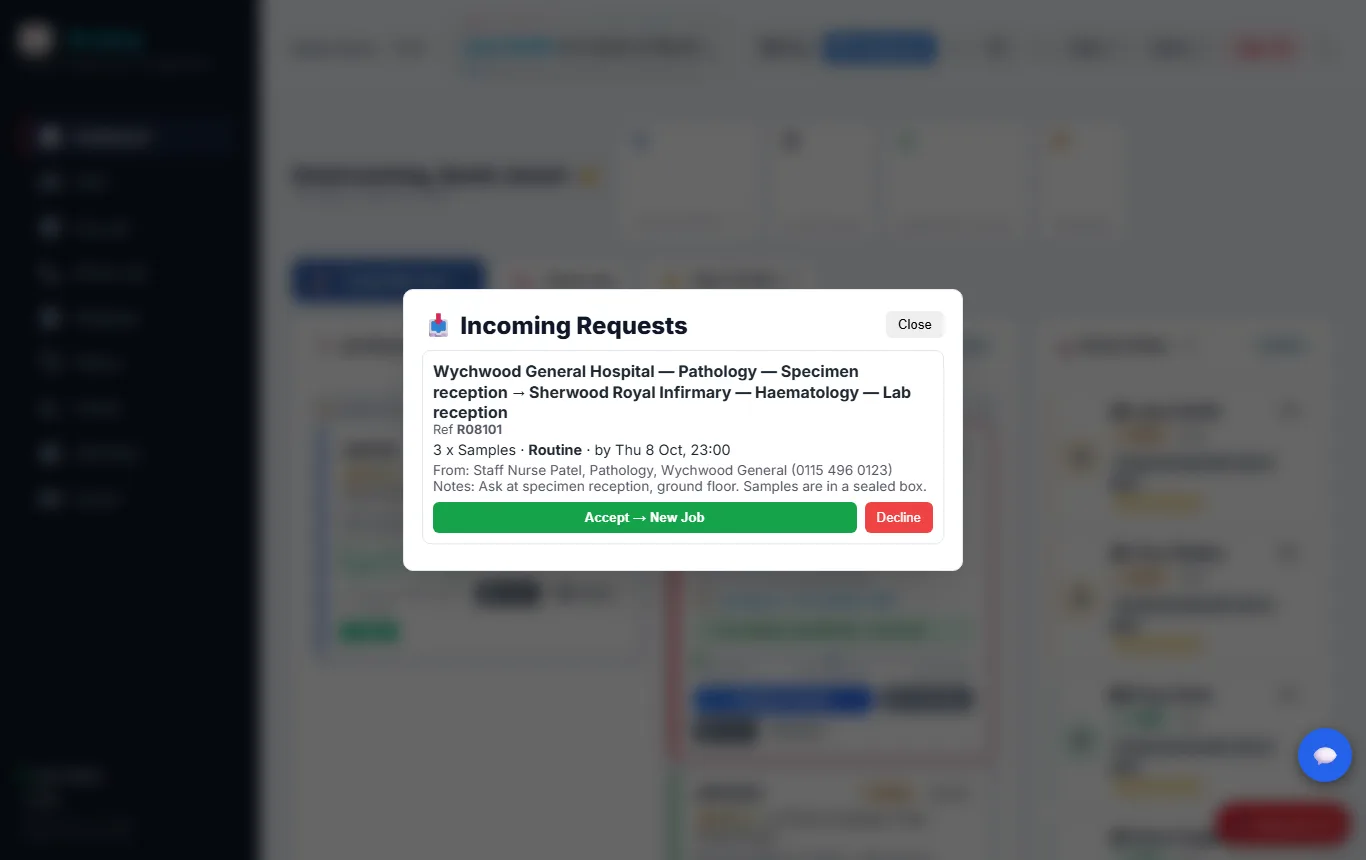
Accept, and it goes on the board as a job with its own number, the caller and the needed-by time already filled in. Decline, and the ward sees the reason you give, so nobody is left wondering.

Step three

They can see where it is

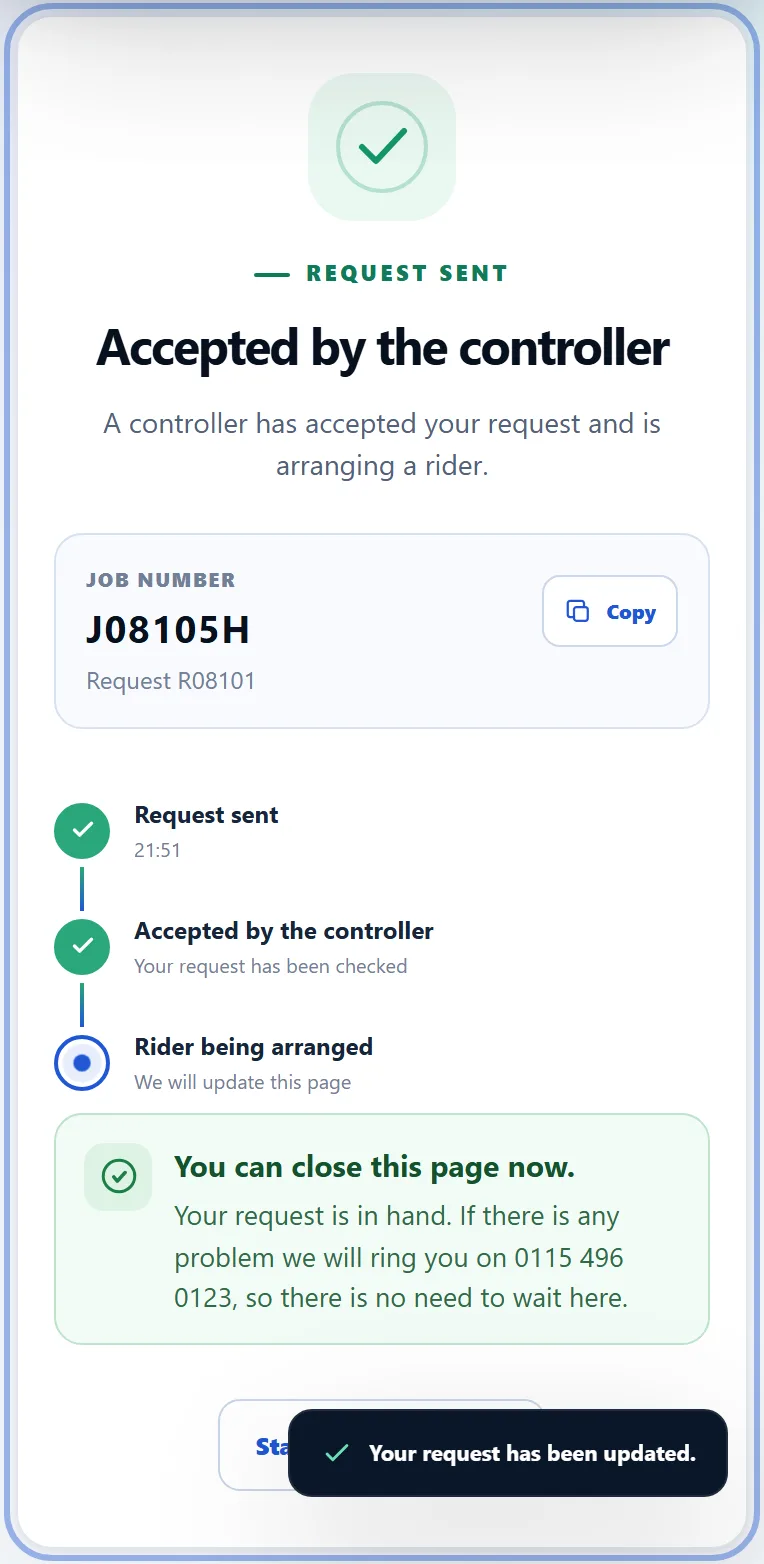
The ward's page updates by itself: accepted, then the job number, then collected and delivered. Once it's accepted they can close it. If there's a problem, Control rings the number they gave.
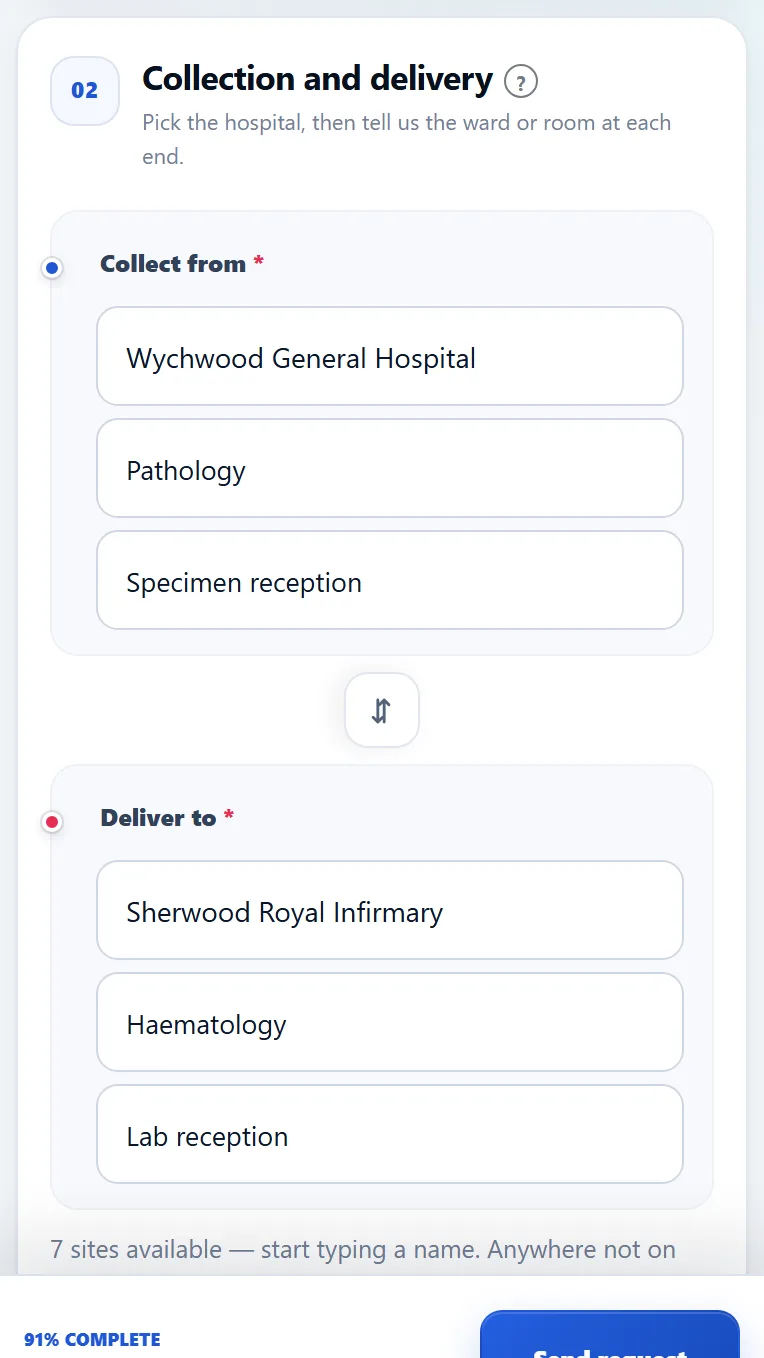
The request form: where to collect from and deliver to
Type a few letters and pick the hospital, department and ward
The request sent, with its reference
A reference straight away, while it waits for a controller
The ward's page after the request is accepted, showing the job number
Accepted, and now showing the job number
Why it matters

Fewer phone calls, and a record of every ask

Jobs go missing in phone calls that never quite happened. A request made on the page is written down the moment it's sent: who asked, from where and when. Accepted or declined, it's in the request log, even if the job is later cancelled or lost.
  • ✓ One code for the whole group, or a ward's own code on a printed poster with a QR code
  • ✓ A ward's code fills in its hospital, department and ward for them
  • ✓ Poster gone missing? Cancel that one code. Nothing else changes.
  • ✓ Wrong codes hit the same lockout as a wrong password
  • ✓ The ward's name and number go to controllers only, never to volunteers
A hospital request waiting on the controller's screen, with Accept and Decline
Running the team

The volunteer side of the group, in the same place as the jobs

Plenty of groups keep a second system for the rota, the policies and the training records, with its own logins and its own copy of every volunteer. Artery now covers the parts most groups use one for. One list of people, one password each.

Shifts

Regular shifts, swaps and cover without a ring-round

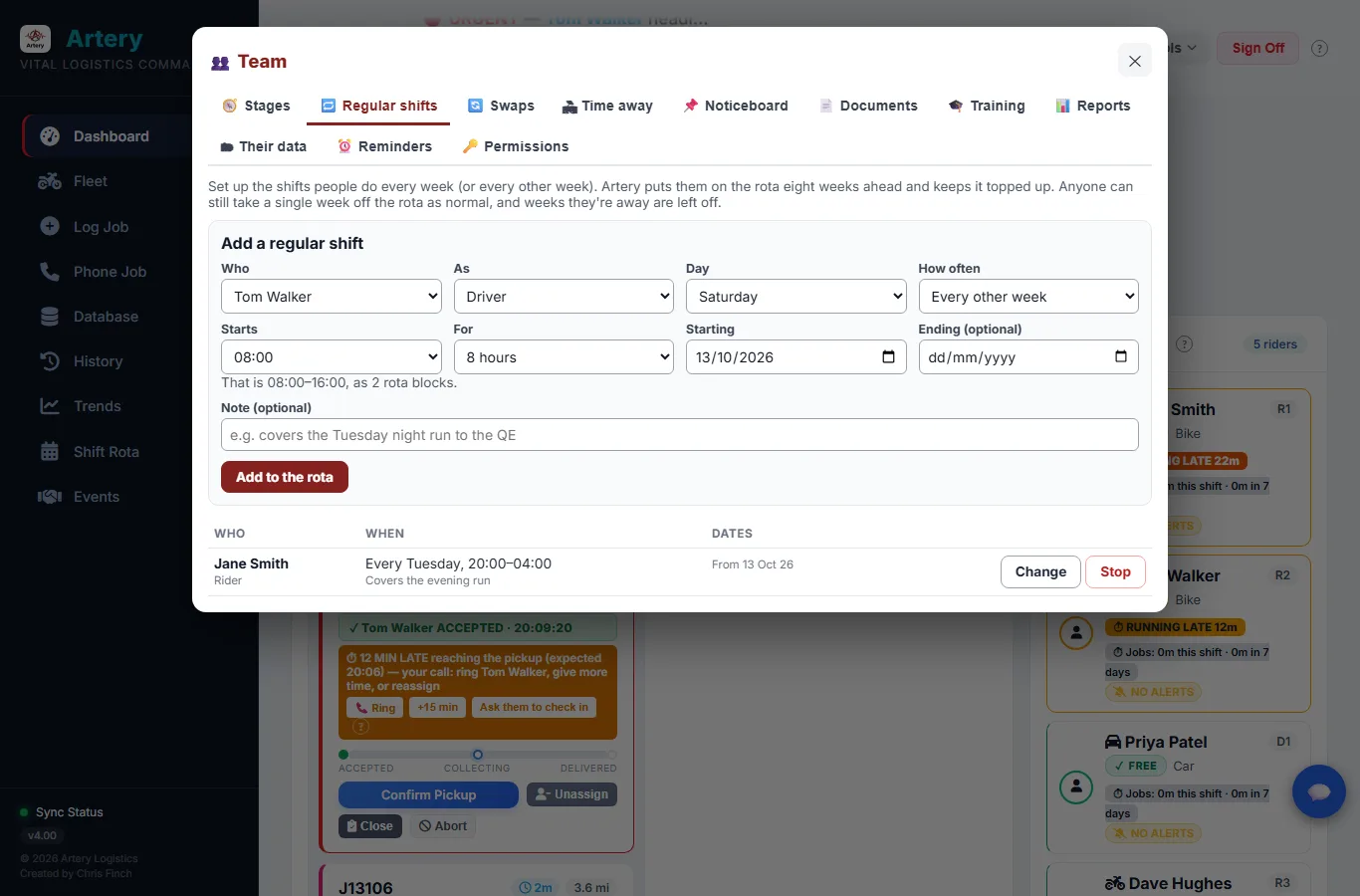
Most volunteers do the same night every week, or every other week. Set that up once and Artery keeps it on the rota eight weeks ahead, leaving out the weeks they've said they're away. When life gets in the way, they can swap with a colleague or pick up a shift that needs cover, all from their phone.
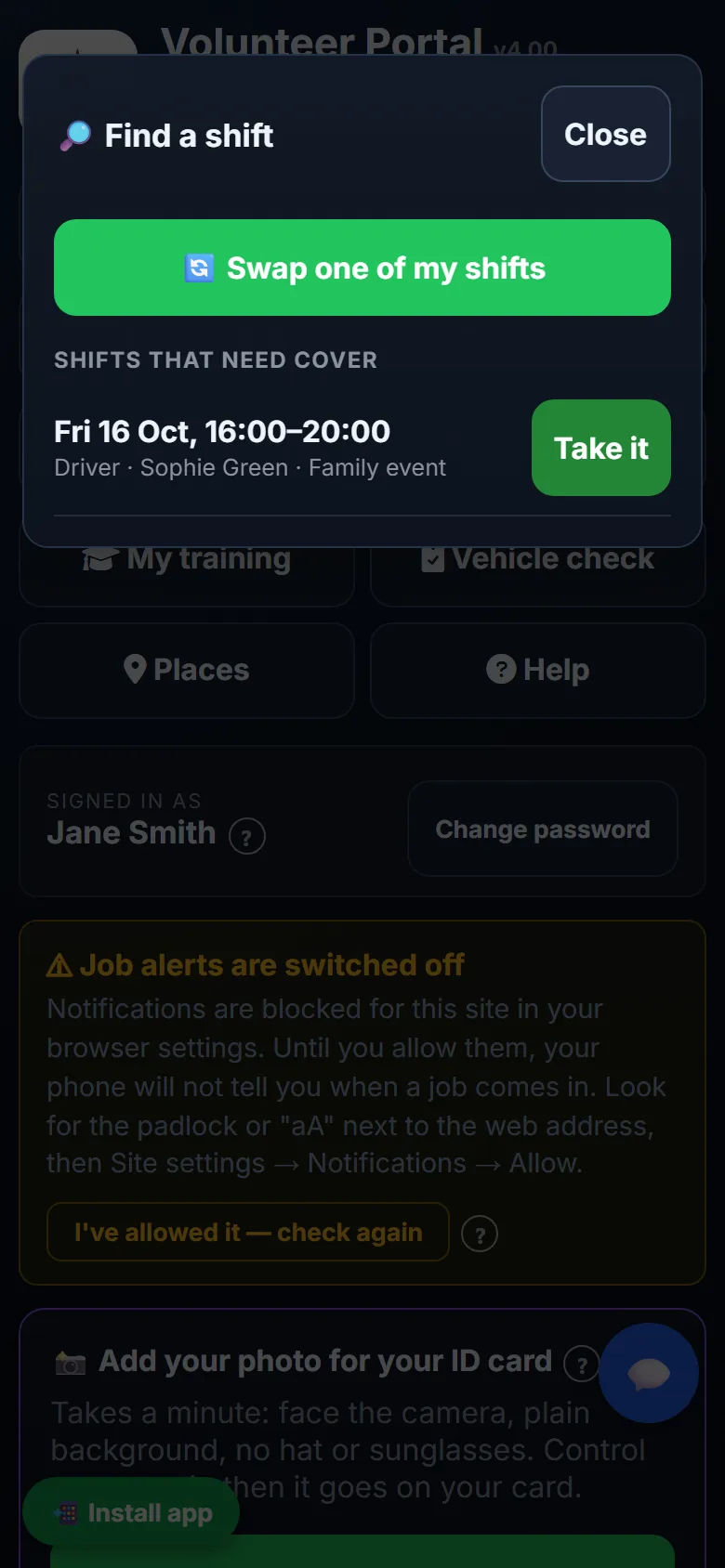
  • ✓ Find a shift lists everything that needs cover. One tap to take it.
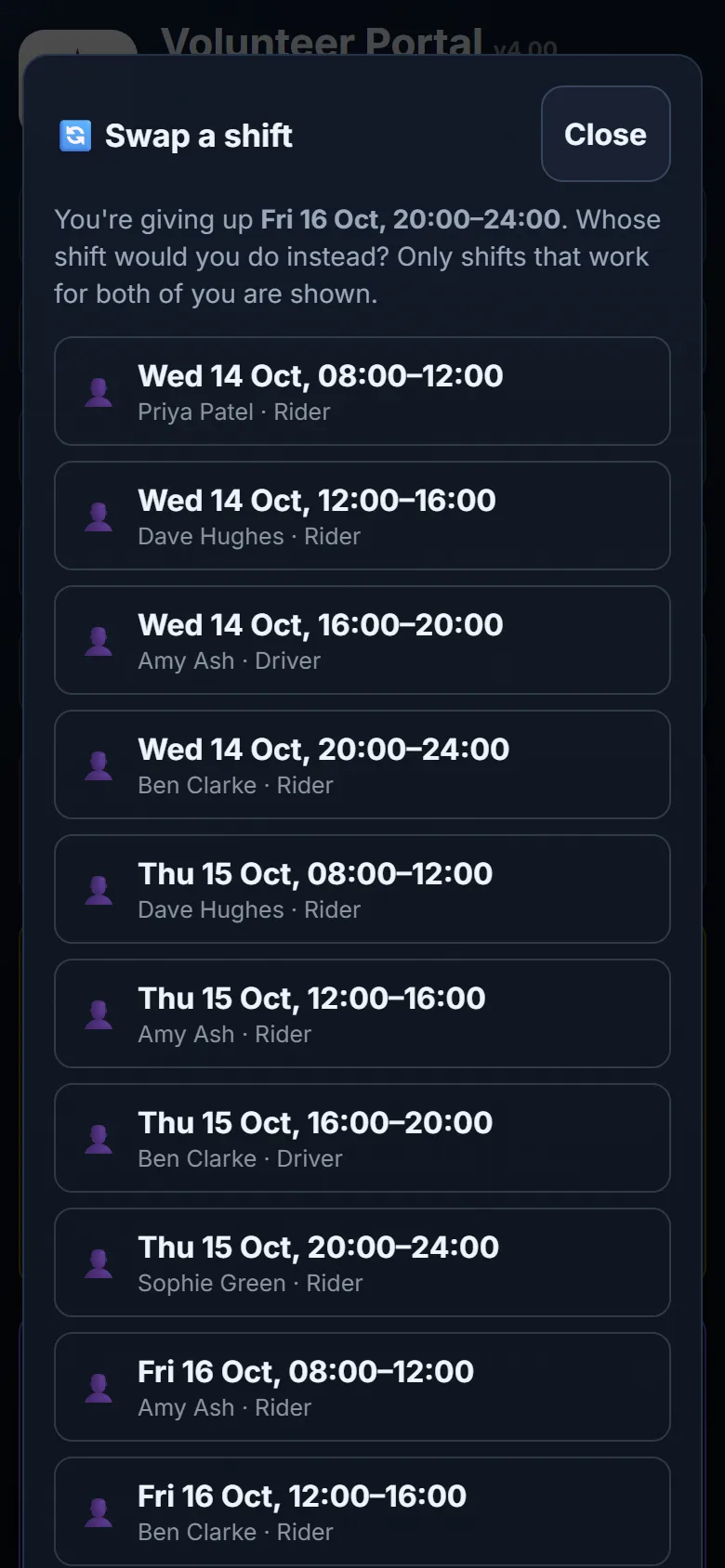
  • ✓ Swaps only offer shifts that work for both people, and nothing moves until the other person says yes
  • ✓ A swap starting within 24 hours is flagged to the duty controller
  • ✓ Time away booked in advance, so the gaps show up before the week arrives
  • ✓ A reminder before each shift, by notification or email
  • ✓ Their shifts in their own phone calendar, through a private link they can switch off whenever they like
Setting up a regular shift: who, which day, how often and from when
Find a shift on a volunteer's phone, with a shift that needs cover and a Take it button
Shifts that need cover, ready to take
Choosing whose shift to swap with
Only swaps that suit both people are offered
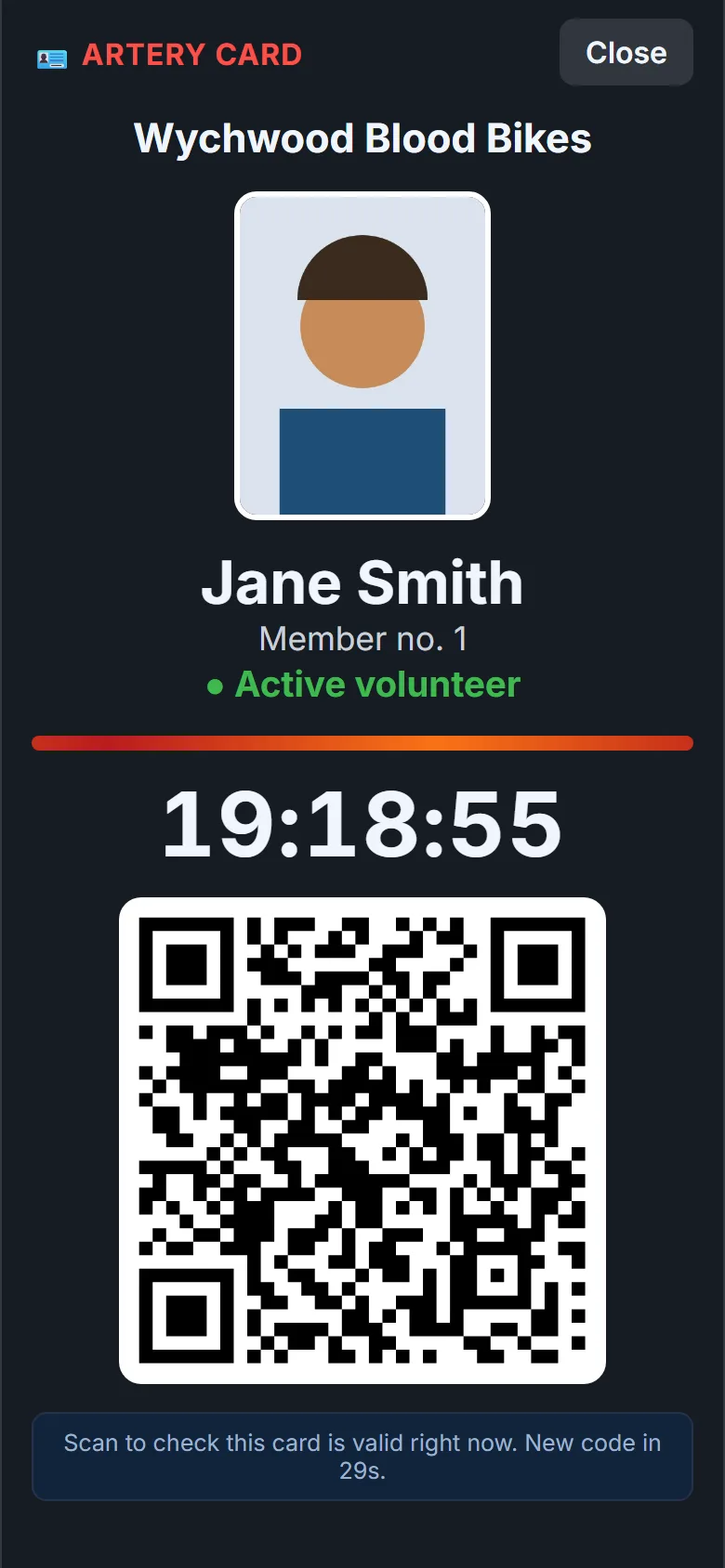
The Artery card on a phone: photo, name, member number and a QR code that keeps changing
The Artery card. Scan the code to check it's valid right now.
Policies and notices

Know who has actually read the lone working policy

Keep the handbook, the policies and the forms in one library on everyone's phone. For the ones that matter, tick everyone must confirm. Volunteers tap I've read it, and you can see at a glance who hasn't.
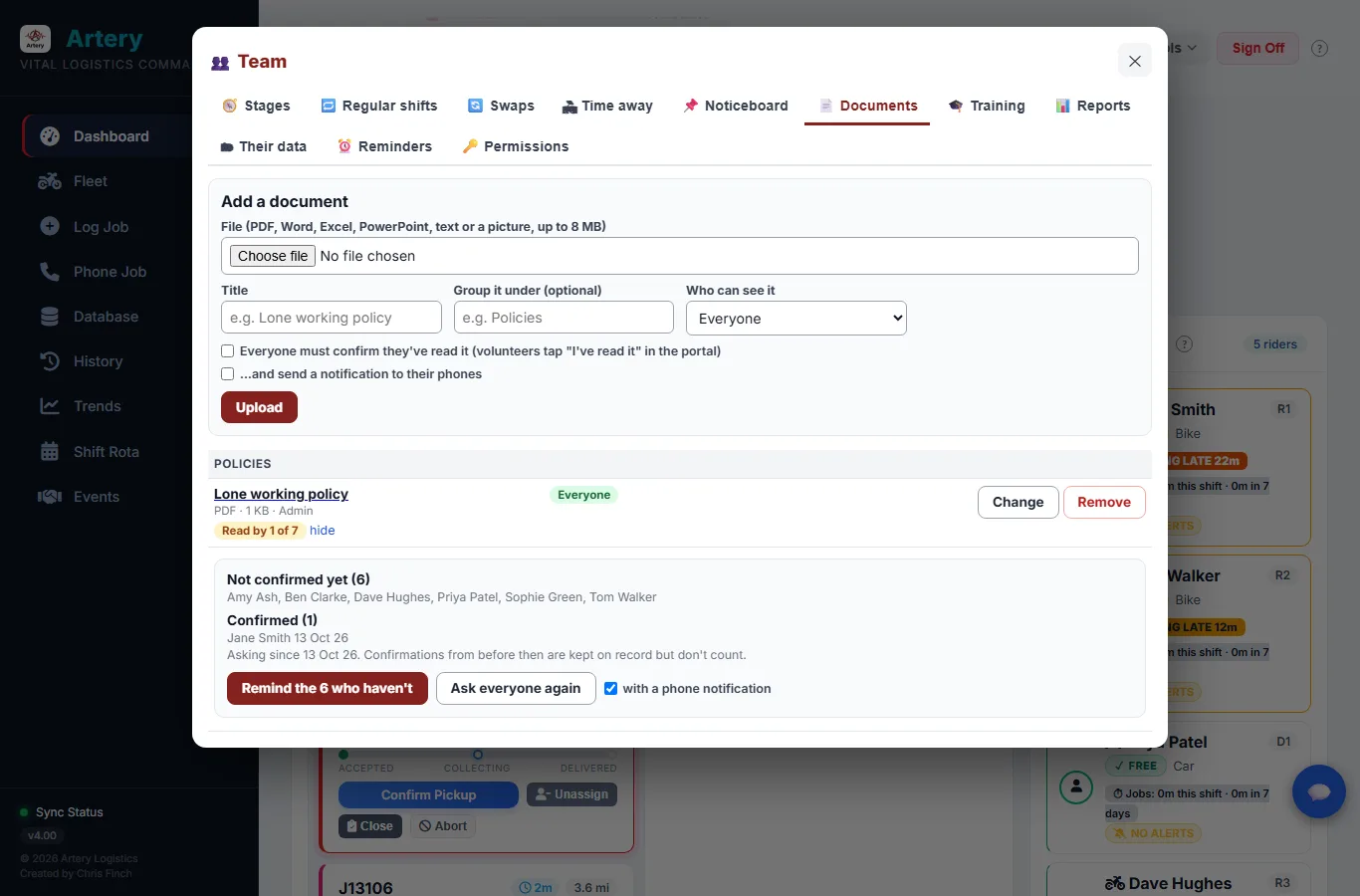
  • ✓ "Read by 12 of 30", with the names of the other 18
  • ✓ Reminders go to the people who haven't read it, weekly by default and never more than three times
  • ✓ Policy changed? Ask everyone again. The old confirmations stay on record.
  • ✓ Some documents can be kept for controllers only
  • ✓ A noticeboard for group news, with a phone notification if it can't wait
A must-read policy in the documents library: read by 1 of 7, the names still to read it, and a Remind button
Joining, training and reports

From application to signed off, with the paperwork to show for it

New people start as applicants, move on to training and are signed off when they're ready. Before anyone is signed off, Artery checks the training their role needs. If something is missing or out of date it says so, and going ahead anyway has to be a deliberate choice that goes in the change log.
  • ✓ Applicants can see the portal but can't book shifts until they've started training
  • ✓ Training records with expiry dates, and a reminder 30 days before one runs out
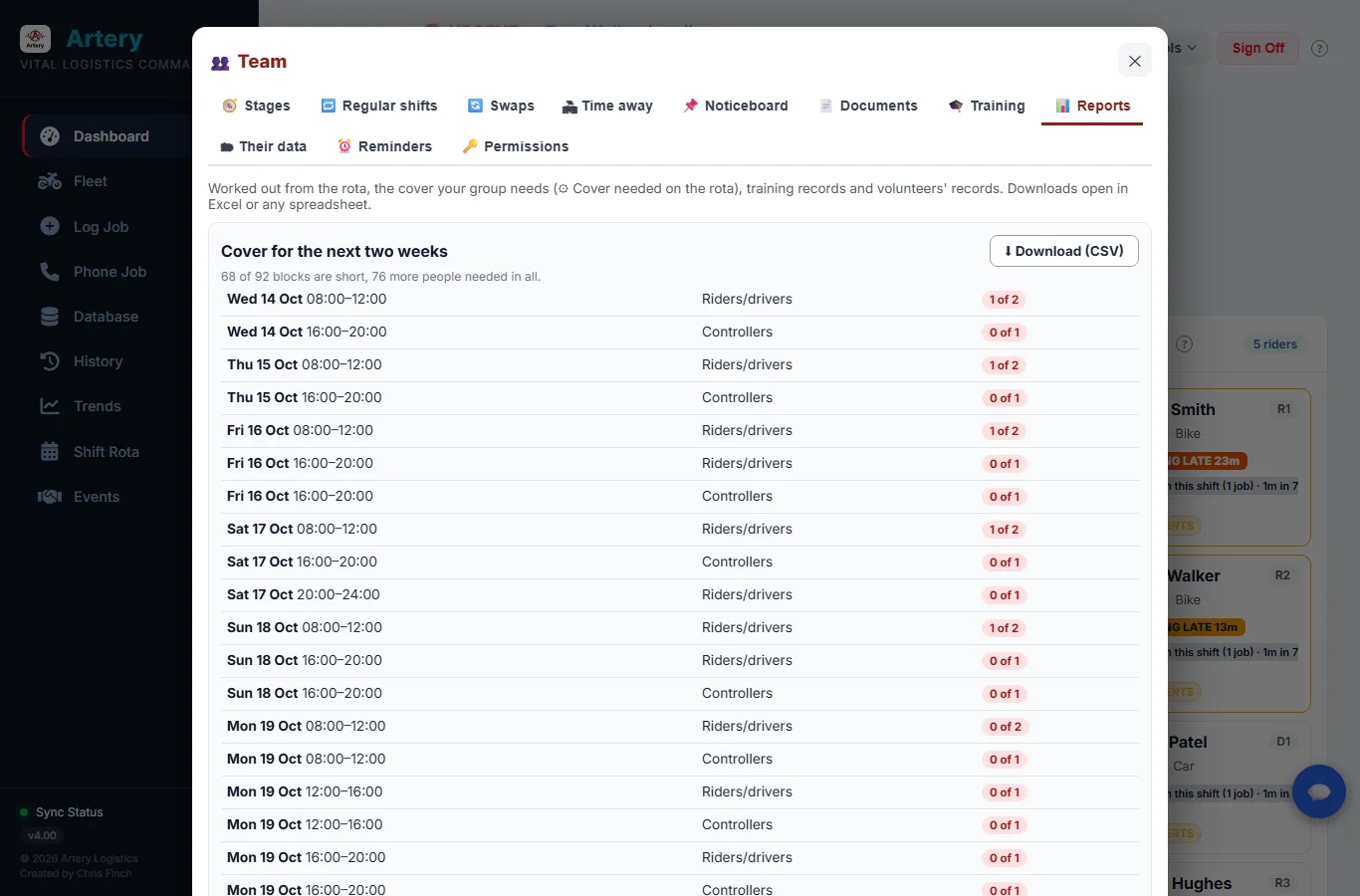
  • ✓ The next two weeks of cover at a glance: which blocks are short and by how many
  • ✓ How full the rota has been, whose training is running out, and who joined when
  • ✓ Every report downloads as a spreadsheet
The Reports tab showing the rota blocks that are short over the next two weeks
And the rest

The everyday jobs of running a group

Not the exciting bits, but the things that otherwise end up in someone's inbox or a spreadsheet only they understand.

💬

Messages

Volunteers can message Control from their phone and add a photo of a locked door or a damaged box. Whoever is on the desk replies. Everything is logged, and volunteers are reminded that an emergency means SOS, not a message.

🪪

Photo ID cards

ID cards with member numbers and expiry dates, as a PDF ready for whoever prints your cards. Upload your group's own card design and Artery fills in each person's photo, name and number. Volunteers take their own photo in the app and an admin approves it.

🔑

Getting volunteers in

Everyone gets a printed or emailed card with their own starter code. They choose a proper password the first time they sign in. If a card goes missing, one button issues a new code and the old one stops working.

🏍️

Vehicles and checks

Bikes and cars with MOT, service and insurance reminders. Riders do a pre-ride check on their phone, and a vehicle marked unfit can't be given to anyone until a controller says it's fixed.

📅

Compliance dates

DBS, advanced-rider, insurance and induction dates for each volunteer. They go amber when they're due and red when they've lapsed, so nobody finds out halfway through a shift.

📋

Handover notes

"The fridge on Ward 4 is broken." A note pinned to every console until the next controller acknowledges it, with who read it and when.

📊

Reports trustees will read

Jobs, miles, how quickly jobs move, and what the same runs would have cost with a commercial courier. Pick any dates and export to Excel. Each figure says how it was worked out.

⏱️

Volunteer hours

Shifts, fundraising days and training all counted, because it's all volunteering. Handy for the annual report and for funding bids.

📥

Bring your group across

Load volunteers, controllers, vehicles and locations from a spreadsheet. Artery shows you how it read every row before anything is saved, and never overwrites what's already there.

🔍

Change log

Who did what and when: jobs made, changed, cancelled and closed, riders signing on and off, rota swaps, database edits. Recorded against whoever was actually signed in, not a name typed into a box.

✏️

Corrections without rewriting history

An admin can fix a record or add a job done on paper. The original is never overwritten, and every change is logged.

🎪

Events and fundraising days

Put an event on, let volunteers sign up from their phones, and see who's coming. The other half of running a charity, in the same place.

Built to be trusted

It has to be there when the phone rings

If Artery stops in the middle of a shift, someone could be left waiting for blood. So a lot of the work you never see goes into keeping it running, finding out fast when it isn't, and never losing a record.

Nightly

Encrypted off-site backups

Every group's data is encrypted and copied off the server each night, on top of the backups kept on the server itself. Updates only ever send code. Your data is never touched by one.

2 min

Health checks

Each group's Artery is checked every two minutes, including the background process that sends the safety alerts. If one stops, we get an email straight away.

Demo first

Tried before it reaches you

Every change goes onto the demo system and gets checked there before any group's Artery is updated. It was used on real shifts by a working blood bike group while it was being built.

And if the worst does happen, Artery prints an "If Artery is down" card for the control desk: who to ring, how to run jobs on paper, how to keep riders safe by hand, and how to put it all back in afterwards. The current release is Artery v4.00.

Security & data protection

Looking after other people's data properly

Artery holds volunteers' personal details, NHS staff phone numbers and where riders are. That's been taken seriously from the first version.

🔒

Passwords nobody can read

Controller passwords, and the passwords volunteers choose, are stored only as bcrypt hashes. Nobody can look one up, admins included. All they can do is reset it.

📱

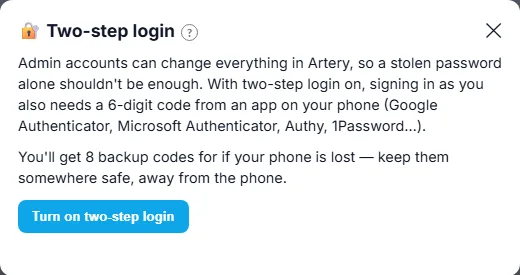
Two-step login for admins

An admin account can change everything, so admins can switch on a six-digit code from an authenticator app, with printed backup codes in case the phone is lost.

🔑

Volunteer sign-in

Volunteers start with a four-letter code on their card and have to choose their own password the first time. After that, the card code no longer works. Repeated wrong guesses hit a lockout that gets longer each time.

👥

Volunteers only see what they need

Next of kin, home addresses and compliance dates are for controllers. A colleague's phone number is shown only while they're on shift, and nobody's position is ever sent to another volunteer.

🚧

Locked unless deliberately opened

Everything needs a signed-in session except a short list of things that have to be public, like the hospital request page. A new feature can't go out unprotected by accident.

🎫

Sessions

A random token in a secure, HttpOnly cookie that runs out after 12 hours of inactivity. Issuing a new code for a lost card, or removing someone's access, signs them out of every phone at once.

🛡️

A locked-down server

A strict content security policy, rate limits and a cap on request size. The data files themselves can't be reached over the web, and outside API keys never get anywhere near a browser.

👑

A main admin that can't be taken over

The group's main Admin account can't be deleted, or have its password changed, by any other admin. It's deliberate: a group can't be locked out of its own system from the inside.

📄

A proper risk assessment

A Data Protection Impact Assessment covers what's held, who sees it, where it goes and the risks that are left, including the ones we'd rather not have. Ask and we'll send it.

🧩

Give someone a job, not the admin keys

A controller can be made rota manager, training officer, keeper of volunteer records or the person who runs the reports, without becoming a full admin. Take it away and it stops working straight away.

📦

Subject access requests

If a volunteer asks what you hold on them, an admin can put it all together in a couple of clicks: their record, shifts, hours, training, messages with Control and more. Passwords and other people's details are left out.

🪪

ID that can be checked on the spot

The Artery card on a volunteer's phone has a QR code that keeps changing, so an old screenshot soon stops working. Scanning it shows whether the card is valid right now. Remove someone's access and their card says NOT VALID at once.

Each group has its own separate Artery, with its own data and its own web address. There's no shared pool and no group can see another's information. It all runs over HTTPS on UK hosting.

The Artery Project
Built by a blood bike volunteer

Written from scratch, for the people who ride and the people on the desk.

v1.40 v2.00 v3.00 v4.00 · live
The story

Made by a volunteer, not a software company

Artery wasn't bought in, and it isn't courier software with the logo changed. It was written from scratch by a blood bike volunteer, a feature at a time, and almost every feature is there because of something that happened on a real shift. The SOS chain is there because riders go out alone. The door-level locations are there because a postcode isn't enough on a big hospital site. The phone sheet puts the job number at the top because it needs reading out before the caller hangs up.

It doesn't belong to any one group. Each group gets its own separate Artery, and every change is tried on the demo system before it reaches anyone's control room. It was used for real shifts by a working blood bike group while it was being built, and it still gets better most weeks, usually because somebody asked for something.

Chris, the Artery Projectchris@arterybb.uk
Guides & downloads

Step-by-step guides you can print or pass round

Six short guides with screenshots, written for the people who'll use each part. Handy for a committee meeting, a training evening, or the volunteer who'd rather read it than be shown. They're small enough to open on a phone or forward by email.

Rather have it all in one place?

Download all seven guides ZIP · 6.1 MB Full user manual PDF · 32 pages · 0.5 MB

The zip has the six guides above plus the user manual, which covers riders, controllers, admins and hospital staff.

Sponsor Artery

Free for every blood bike group. Help keep it that way.

No group pays to use Artery, and none ever will. What does cost money is the servers that keep every group's app running around the clock. Companies that sponsor Artery cover that cost, and are thanked here in front of every blood bike group that visits.

🖥️

Sponsor the servers

Every group gets its own private copy of Artery on UK hosting. A company sponsorship pays for those servers, so the groups never have to.

Talk to us about sponsoring →
🤝

Give a service instead

Hosting companies, IT firms and suppliers can help just as much by donating a server, a domain or other services Artery runs on, instead of money.

Offer a service →
❤️

Donate as an individual

Not a company? Every pound on the GoFundMe goes on the servers that keep Artery free for blood bike groups.

Donate on GoFundMe →

What sponsors get: your logo and a link to your website here on arterybb.uk, and a public thank-you when you come on board. Artery itself stays free of adverts. Your support is shown here, never inside the app the riders and controllers use.

Before you ask

Questions groups usually have

The things most blood-bike groups want to know before taking a closer look.

What does Artery cost?
Nothing. Artery is free for blood bike groups, and always will be. It's built and looked after by a volunteer for the blood bike community, not sold as a commercial product. The cost of the servers is covered by sponsors and donations, not by the groups that use it.
Can we try it before we decide?
Yes, and we'd encourage it. There's a demo system full of made-up hospitals, riders and jobs, so nothing you do there matters. Register your interest and we'll set you up as both a controller and a volunteer. Have the console open on a computer and the portal on your phone, give yourself a job, and watch it move from one to the other. The guides are there to share with your committee.
What actually happens if one of our riders comes off?
They press SOS. Every controller gets an alarm on screen and a notification on their phone, with the time and the rider's position as coordinates they can read to 999. With no signal, the SOS waits on the phone and sends itself as soon as it can. If nobody acknowledges it within four minutes, everyone is alerted again and an email goes to the group's backup address. If it's still live ten minutes after someone acknowledged it, everyone hears again. The rider's phone shows when a controller has seen it. Every SOS stays in the SOS log for good.
Does it track our volunteers?
That's your group's choice, and volunteers are told which you've chosen before they first sign on. There are three settings. While on shift: the phone sends its position every few minutes while they're signed on, more often during a job. Only during a job: nothing while they're waiting. Off: no routine position reporting at all. Whichever you pick, it stops when they sign off, positions go only to your controllers (never to other volunteers), and pressing SOS always sends where they are. Controllers always see how old a position is.
Can hospitals raise jobs themselves?
Yes. Ward and lab staff open a web page and type an access code. That can be your group's shared code, or a ward's own code from a poster with a QR code, which fills in their hospital and ward for them. There's no account, app or training. They get a reference straight away. Your controllers accept or decline, with a reason the ward can see, and once accepted the ward's page shows the job number and follows it through to delivery.
How long does it take to get set up?
Your group gets its own separate Artery with its own web address. Most of the work is getting your volunteers, controllers, locations and vehicles in, and that can come straight from a spreadsheet. Volunteers are issued portal codes automatically, and you can print or email their cards. There's a setup walkthrough and a template sheet, and we'll help you through it.
Is our data safe, and who is responsible for it?
Your group is the data controller for its own Artery. We host and maintain it as the processor. Nothing is shown until someone signs in, every connection is encrypted, and passwords are stored only as bcrypt hashes. Admins can add two-step login. Volunteers can't see each other's next of kin, addresses, compliance dates or positions. Each group's data is kept apart on UK hosting and backed up, encrypted, off the server every night. There's a written Data Protection Impact Assessment, and we'll send it if you ask.
Do riders need to install an app?
Not from an app store. The Volunteer Portal runs in the phone's browser and can be added to the home screen, where it opens full-screen like any other app. If the signal drops, signatures, SOS alerts and answers to jobs wait on the phone and send themselves when it comes back, even if the app has been closed or the phone restarted.
What if Artery goes down in the middle of a shift?
We find out within a couple of minutes, because every group's Artery is checked constantly and we're emailed if one stops. In the meantime your controllers have the printed "If Artery is down" card: who to ring, how to run jobs on paper, how to keep riders safe by hand, and how to put the paper jobs back in afterwards. Your data is backed up on the server and off it every night.
What happens when something needs fixing or updating?
Updates go onto the demo system first, then out to groups. They only ever send code, never data, and jobs in progress carry on through them. Everyone has to sign in again afterwards, and that's all most people notice. There are written recovery steps and a sealed emergency pack, so a group never depends on one person being reachable.
Do we still need a separate volunteer management system?
Maybe not. Artery now does regular shifts, swaps and cover, time away, a noticeboard, a document library where people confirm they've read the policies, training records, joining stages and reports on all of it. The best way to know is to try it on the demo against the things your group actually uses. If you'd rather keep what you have for the people side, that's fine. Artery's dispatch and rider safety work just as well on their own.
A volunteer has asked for a copy of their data. Can Artery help?
Yes. An admin, or a controller you've given volunteer records to, can download everything Artery holds about one person: their record and photo, shifts and swaps, hours, jobs they carried, SOS records, their messages with Control, training, and the documents they've confirmed. Passwords and other people's details are left out, and the download says plainly if any part couldn't be read. Making one is noted in the change log.
Can more than one group use Artery?
Yes. Each group runs its own independent instance with its own data, web address and logins — they're never mixed together. Adding a new group doesn't affect any existing one.
Bring Artery to your group

Try it with your own shifts in mind

If your group moves blood, samples, donor milk, medication or anything else where the clock is running, get in touch. We'll set you up on the demo system with made-up data so you can click about freely, as a controller and as a volunteer.

  • ✓ A walk through dispatch, the rider's app and the SOS chain, on a call if you'd like one
  • ✓ Straight answers about setting up, updates and your data
  • ✓ No pressure. It's free, and there's nothing to sell you.

Register Interest

Tell us a little about your group and we'll be in touch.

This comes straight to me, and I'll reply personally. Your details are only used to talk to you about Artery, and they're never passed on.

✓

Thanks, that's come through

I'll be in touch soon to get you set up on the demo.